Test catalogue
Every unit test of the example plugins: what it checks, and how to see the same thing on a live Open-WebUI. It is built from the tests' docstrings each time the site is built (see Describe every test), so it always matches the code it links to.
Before a release, a reviewer can walk the green By hand boxes on a test instance. Grey boxes say why a test has no live equivalent.
198 tests · 198 described · 176 with live steps · 22 checked only by the unit test · 35 screenshots from a real Open-WebUI
clear_thinking_tags
test_clear_thinking_tags.py
Clear thinking tags against a mock Open-WebUI: a reply that ends in reasoning with no answer after it gets that reasoning as its answer. Run with owpp test clear_thinking_tags.
A reply that ends in reasoning gets it as its answer
test_a_reply_that_ends_in_reasoning_gets_it_as_its_answer
In Open-WebUI 0.12+ a reply is a list of output items, and the chat shows what that list holds. When it ends in reasoning with no answer after it, the reasoning becomes the answer, in output and in content.
By hand
With a model that sometimes stops while thinking, ask it something until a reply has a closed Thinking block and nothing after it. With this filter on, the thinking text is shown as the reply instead.
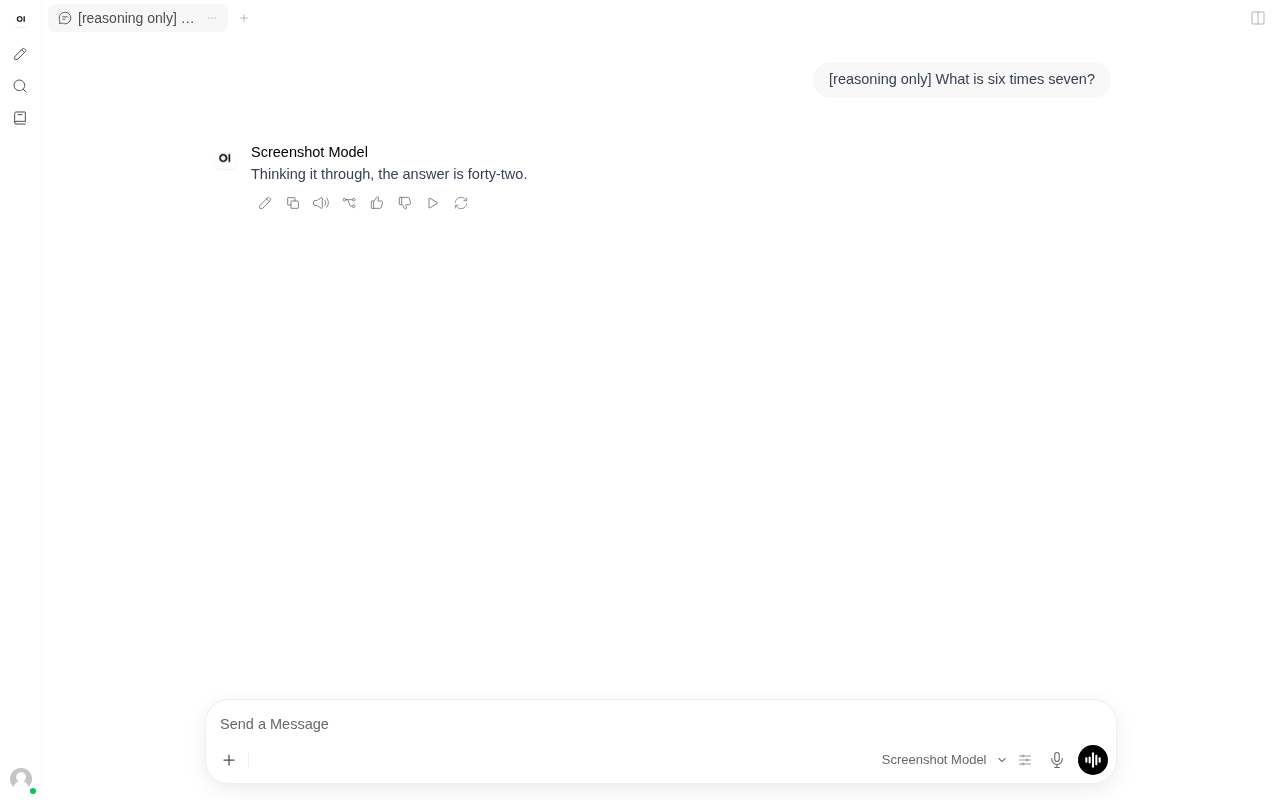
With the filter: the same reply, and its thinking text is shown as the answer.
A reply with an answer after its reasoning is left alone
test_a_reply_with_an_answer_after_its_reasoning_is_left_alone
Reasoning followed by an answer is the normal case, and nothing changes.
By hand
Ask a thinking model something. The reply shows the Thinking block and the answer, as without the filter.
An empty answer after the reasoning does not count as one
test_an_empty_answer_after_the_reasoning_does_not_count_as_one
An empty message item after the reasoning is skipped over: the reasoning still becomes the answer.
By hand: not a live check
Not repeatable on purpose; it depends on how the model streamed its reply.
An older reply with an unfinished thinking block gets its text
test_an_older_reply_with_an_unfinished_thinking_block_gets_its_text
Before 0.12 the reasoning was a <details type="reasoning" done="false"> block in the reply's text. When it was never closed, its text, unquoted, replaces it.
By hand: not a live check
Not repeatable on Open-WebUI 0.13, which no longer writes replies this way.
A reply from the user or no messages changes nothing
test_a_reply_from_the_user_or_no_messages_changes_nothing
Only the last message counts, and only when the assistant wrote it.
By hand
Not needed; a chat always ends with the assistant's reply when outlets run.
excalidraw
test_excalidraw_filter.py
The Excalidraw filter: the artifact it adds to replies, and the editor page and API it serves, against a mock Open-WebUI. Run with owpp test excalidraw.
The tools artifact is added to the reply as an html block
test_the_tools_artifact_is_added_to_the_reply_as_an_html_block
When the tool's result carries an artifact, the filter appends it to the reply as an html code block.
By hand
Ask the model to draw something. The reply ends with an html code block and the editor opens in the Artifacts panel.
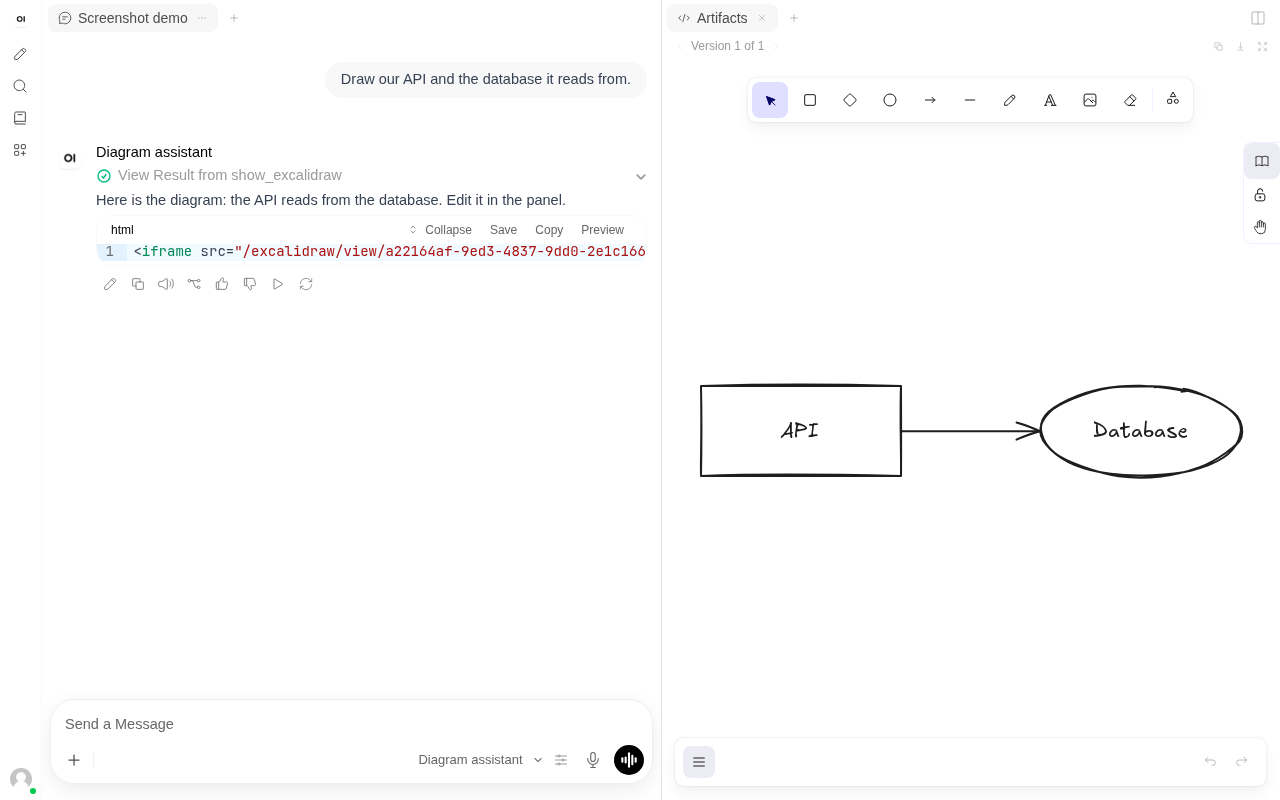
The model called show_excalidraw; the filter added the editor to the reply, and it opened in the Artifacts panel with the drawing.
An artifact an earlier reply already shows is not added again
test_an_artifact_an_earlier_reply_already_shows_is_not_added_again
An artifact that an earlier reply in the chat already shows is not appended again.
By hand
In a chat that has a drawing, ask the model to show the drawing again. The new reply has no second html block, and the Artifacts panel still shows one editor.
A reply without the tool passes through
test_a_reply_without_the_tool_passes_through
A reply in which the tool was not called is left exactly as it was.
By hand
Ask something that needs no drawing ("say hi"). The reply has no html block.
Inlet leaves the request alone
test_inlet_leaves_the_request_alone
The filter does not change what the user sends.
By hand
Send a message: the model answers it as written. (Nothing else to see.)
The page needs a signed in user
test_the_page_needs_a_signed_in_user
The editor page needs a signed-in user. A browser is sent to the sign-in page, with a redirect back; any other client gets 401.
By hand
Copy the editor's URL, /excalidraw/view/<chat id>, into a private window. You land on /auth, and after signing in you are back on the editor. curl -i <URL> gets 401.
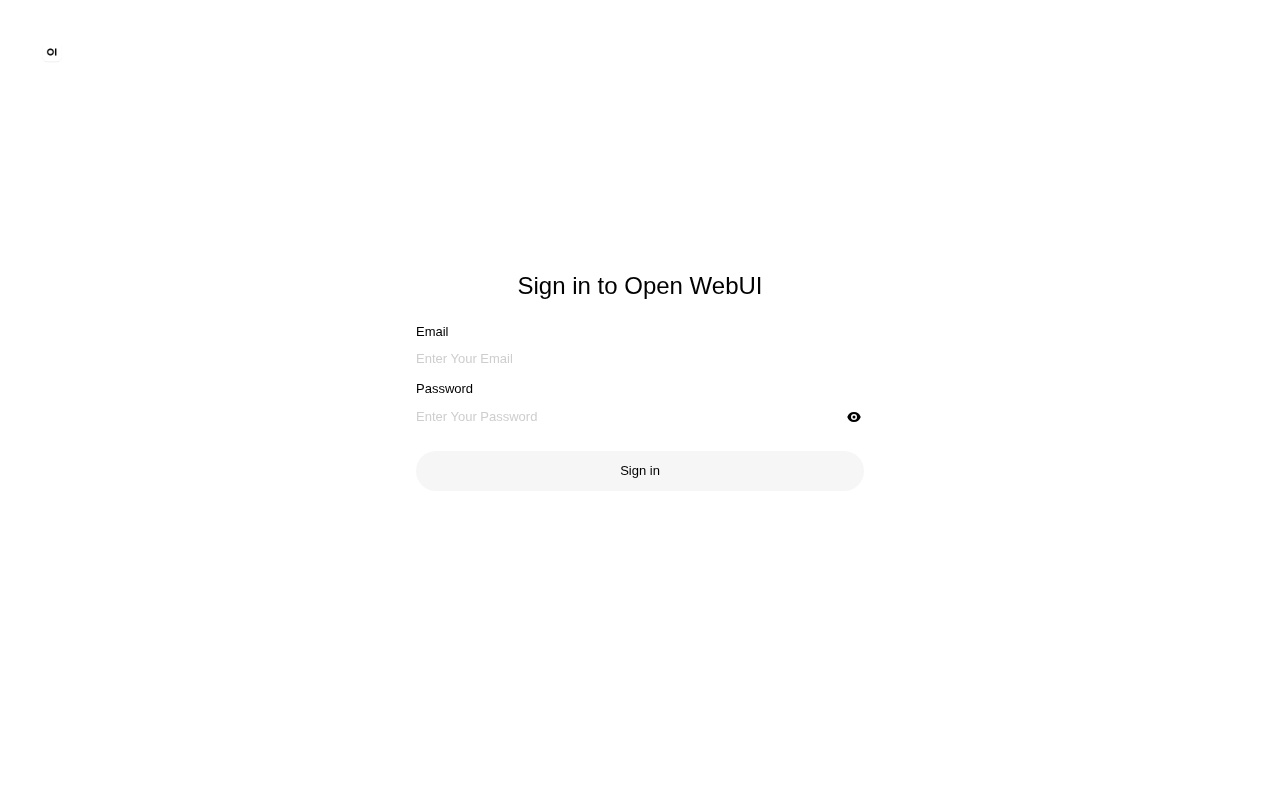
Signed out, the editor's address sends the browser to Open-WebUI's sign-in page, with a redirect back to the editor.
The page is only for people who can write to the chat
test_the_page_is_only_for_people_who_can_write_to_the_chat
Only someone who can write to the chat may open its editor. Without access, or with read access only, the answer is 404, which does not reveal that the chat exists.
By hand
As a second user, open /excalidraw/view/<the first user's chat id>: 404. Give them read access to the chat: still 404. Give them write access: the editor opens.
The page carries a token for this chat and is never cached
test_the_page_carries_a_token_for_this_chat_and_is_never_cached
The editor page embeds a signed token for its chat (s.<expiry>.<signature>), has every placeholder filled in, and is sent with Cache-Control: no-store.
By hand
Open the editor with the browser's network tab open. The page's response headers include cache-control: no-store. View source: it has const token = "s.…", and no __TOKEN__ or __VERSION__.
The token lasts as long as the valve says
test_the_token_lasts_as_long_as_the_valve_says
The SESSION_TOKEN_HOURS valve sets how long the page's token is good for.
By hand
Set the Excalidraw function's SESSION_TOKEN_HOURS valve to 1 and reload the editor. In its source, the number after s. in the token is a Unix time about an hour from now (date -d @<number>).
The api serves the drawing with the pages token
test_the_api_serves_the_drawing_with_the_pages_token
The editor's API serves the drawing to whoever holds the page's token, with no cookie (the editor runs in a sandboxed iframe) and CORS open to any origin. Asked again with since=<that version>, it answers that nothing changed.
By hand
Copy the token from the editor's source and run curl -i '<host>/excalidraw/api/scenes/<chat id>?t=<token>': the elements, changed: true, and access-control-allow-origin: *. Add &since=<the version it returned>: {"changed": false, ...}.
The model called show_excalidraw; the filter added the editor to the reply, and it opened in the Artifacts panel with the drawing.
The api refuses a missing wrong or other chats token
test_the_api_refuses_a_missing_wrong_or_other_chats_token
Without a token, with a made-up one, or with another chat's token, the API answers 404.
By hand
Repeat the curl above without ?t=, with t=s.9999999999.x, and with the token from a second chat's editor page. Each one gets 404.
The editor saves the users edits for the model to read
test_the_editor_saves_the_users_edits_for_the_model_to_read
An edit made in the editor is saved into the chat (the next version, marked with the browser's id), and the model's read_excalidraw sees it.
By hand
In the editor, drag the rectangle to the right and wait a moment. Reload the editor: it is still moved. Ask the model what the drawing looks like: it calls read_excalidraw and describes the new position.
A malformed save is refused
test_a_malformed_save_is_refused
A save that is not JSON, has no client, or whose elements is not a list gets 400.
By hand
curl -i -X POST '<host>/excalidraw/api/scenes/<chat id>?t=<token>' -d 'not json': 400. The same with -d '{"elements": []}' and with -d '{"client": "c", "elements": {}}'.
Once disabled nothing is served
test_once_disabled_nothing_is_served
Once the function is disabled, neither the editor page nor its API is served, even with a valid token.
By hand
With an editor open, switch Excalidraw off under Admin Panel > Functions. Reload the editor: 404. The API curl with the token: 404.
A new version replaces the routes instead of adding to them
test_a_new_version_replaces_the_routes_instead_of_adding_to_them
Updating the function replaces its routes rather than adding a second copy, and they stay ahead of Open-WebUI's catch-all web app.
By hand
Save the function's code again (Admin Panel > Functions > Excalidraw > Save), then open the editor: the editor loads, not the Open-WebUI app. That the routes were not duplicated can only be seen in this test.
test_excalidraw_self_host.py
EXCALIDRAW_ASSETS_URL makes the editor page load everything from a host you run, and the self-host build matches what the page imports. Run with owpp test excalidraw.
By default it comes from esm sh
test_by_default_it_comes_from_esm_sh
With EXCALIDRAW_ASSETS_URL unset, the editor loads Excalidraw 0.18.0 from esm.sh through an import map, along with esm.sh's stylesheet.
By hand
With the variable unset, open the editor with the network tab open. The scripts and index.css come from esm.sh.
An empty value is the default too
test_an_empty_value_is_the_default_too
An empty EXCALIDRAW_ASSETS_URL is the same as leaving it unset.
By hand
Set EXCALIDRAW_ASSETS_URL= (empty) in Open-WebUI's environment and restart. The editor still loads from esm.sh.
Self hosted the page has nothing from the internet in it
test_self_hosted_the_page_has_nothing_from_the_internet_in_it
With EXCALIDRAW_ASSETS_URL set to a URL, the page loads index.css, editor.js and the fonts (EXCALIDRAW_ASSET_PATH) from there, and nothing from esm.sh.
By hand
Build self-host/ with build.sh, serve the result, set EXCALIDRAW_ASSETS_URL to its URL and restart. Open the editor with the network tab open: every file comes from your host and none from esm.sh.
A trailing slash does not double up
test_a_trailing_slash_does_not_double_up
A trailing slash on EXCALIDRAW_ASSETS_URL does not produce // in the paths.
By hand
Set the URL with a trailing slash and restart. The network tab shows .../excalidraw/editor.js, not .../excalidraw//editor.js.
A path on the same host works too
test_a_path_on_the_same_host_works_too
A path on Open-WebUI's own host, such as /excalidraw-static, works as well as a full URL.
By hand
Serve the build at /excalidraw-static on the same host (behind your reverse proxy, say), set EXCALIDRAW_ASSETS_URL=/excalidraw-static and restart. The editor loads from that path.
The token and version are filled in and nothing is left over
test_the_token_and_version_are_filled_in_and_nothing_is_left_over · 2 cases
Either way (esm.sh or self-hosted), the token and version are filled in, and no __PLACEHOLDER__ or <!-- marker --> is left in the page.
By hand
View the editor's source with the variable unset and again with it set. Neither has a __NAME__ placeholder or an HTML comment.
The page script imports everything it uses
test_the_page_script_imports_everything_it_uses · 2 cases
Either way, the page's script imports React, the Excalidraw component and the helpers it calls, so the editor can start. A stray marker in the template once cut the imports out.
By hand
Open the editor with the browser's console open. There is no "is not defined" error, and the drawing appears.
A value that could break out of the page is refused
test_a_value_that_could_break_out_of_the_page_is_refused · 8 cases
A value that could break out of the HTML, or that is not a plain http(s) URL or path, is ignored with a warning, and the page falls back to esm.sh.
By hand
Set EXCALIDRAW_ASSETS_URL=javascript:alert(1), or any of the values listed above, and restart. The editor loads from esm.sh, and the log says the value "is not a plain http(s) URL or path".
The setting is in config yaml and listed by check
test_the_setting_is_in_config_yaml_and_listed_by_check
EXCALIDRAW_ASSETS_URL is declared in config.yaml (default empty), so owpp check lists it.
By hand
Run owpp check excalidraw. It prints env EXCALIDRAW_ASSETS_URL.
The pinned versions are the ones the page uses
test_the_pinned_versions_are_the_ones_the_page_uses
self-host/package.json pins exact versions, and they match the page: @excalidraw/excalidraw is EXCALIDRAW_VERSION in shared.py, and react and react-dom are the esm.sh react version in templates/viewer.html.
By hand
Compare those three files.
The built module exports what the page imports
test_the_built_module_exports_what_the_page_imports
self-host/editor.js exports exactly the names that the page's self-hosted branch imports: React, createRoot, Excalidraw, MainMenu, convertToExcalidrawElements.
By hand
Compare the export { ... } line in self-host/editor.js with the const { ... } = await import(...) in the <!--hosted--> block of templates/viewer.html.
The build is reproducible and runnable
test_the_build_is_reproducible_and_runnable
build.sh is executable, stops at the first error (set -euo pipefail), installs from bun.lock with --frozen-lockfile, and copies index.css and the fonts.
By hand
Run ./self-host/build.sh. It succeeds, bun.lock is unchanged, and the output holds index.css and the fonts.
test_excalidraw_tool.py
The Excalidraw tool and the plugin runtime that installs it, against a mock Open-WebUI. Run with owpp test excalidraw. The owui and plugin fixtures come with owpp (docs/testing.md): plugin is this folder, bundled as the deploy would and loaded.
Loading the function installs the tool for everyone
test_loading_the_function_installs_the_tool_for_everyone
Loading the function installs an Excalidraw tool, marked as the function's own and readable by everyone.
By hand
After installing the function, Workspace > Tools lists Excalidraw, and a user who is not an admin can turn it on in a chat.
A tool an earlier runtime shared with anyone is shared with every user
test_a_tool_an_earlier_runtime_shared_with_anyone_is_shared_with_every_user
Runtimes before this one granted a public tool to Open-WebUI's no-auth anyone audience, which it ignores for tools, so only admins could use it. The next sync swaps exactly that grant for every signed-in user, and keeps grants an admin added.
By hand
On an instance deployed with an earlier owpp, sign in as a user who is not an admin; Excalidraw is missing from the tools. Deploy this version. The user now sees it, and any group an admin shared it with still has it.
Grants an admin set are left alone
test_grants_an_admin_set_are_left_alone
Once the tool is installed, its sharing is the admin's: a later sync changes nothing.
By hand
Share the Excalidraw tool with one group only, then deploy again. It is still shared with just that group.
The tool goes with the function and comes back with it
test_the_tool_goes_with_the_function_and_comes_back_with_it
Disabling the function removes the tool, enabling puts it back, and deleting the function removes it.
By hand
Under Admin Panel > Functions switch Excalidraw off: it is gone from Workspace > Tools. Switch it on: it is back. Delete the function: it is gone.
A hand made tool with the same id is left alone
test_a_hand_made_tool_with_the_same_id_is_left_alone
A tool with the id excalidraw that someone made by hand is neither overwritten when the function loads nor removed when it is disabled.
By hand
With the function deleted, create a tool with the id excalidraw under Workspace > Tools, then install the function. Your tool's code is unchanged. Disable the function: your tool is still there.
Every method the model sees explains the element format
test_every_method_the_model_sees_explains_the_element_format
The model is offered the five drawing methods. Those that take elements explain the skeleton format, and arguments Open-WebUI fills in, such as __metadata__, are not shown as parameters.
By hand
Open the tool under Workspace > Tools and read the docstrings of these five methods. What the model is actually sent is only visible in this test.
Show creates the drawing and hands the filter an artifact
test_show_creates_the_drawing_and_hands_the_filter_an_artifact
show_excalidraw stores the elements in the chat (version 1, written by the tool) and returns an artifact whose iframe opens /excalidraw/view/<chat id>.
By hand
In a new chat with the tool on, ask "draw a rectangle". The editor opens at this chat's /excalidraw/view/ URL with one rectangle in it.
The model called show_excalidraw; the filter added the editor to the reply, and it opened in the Artifacts panel with the drawing.
Show again without elements changes nothing
test_show_again_without_elements_changes_nothing
Calling show_excalidraw again with no elements only shows the drawing; the version stays the same.
By hand
After the first drawing, ask "show the drawing again". It is the same drawing.
The drawing is kept beside the chats other metadata
test_the_drawing_is_kept_beside_the_chats_other_metadata
The drawing is stored alongside the chat's other metadata, such as its tags, and they are kept.
By hand
Tag a chat, then have the model draw in it. The tag is still there.
Upsert merges by id and gives new elements an id
test_upsert_merges_by_id_and_gives_new_elements_an_id
upsert_excalidraw_elements updates the elements whose id matches and adds the rest, giving each new one an id.
By hand
After a rectangle, ask the model to "move the rectangle right and add the text hi". The rectangle moves (there is not a second one) and the text appears.
Models may pass elements as json text
test_models_may_pass_elements_as_json_text
Elements passed as a JSON string, as some models do, are accepted.
By hand: not a live check
Not reliably repeatable: whether the model sends a string depends on the model.
Replace discards everything and delete takes bound text with its shape
test_replace_discards_everything_and_delete_takes_bound_text_with_its_shape
replace_excalidraw_elements discards the drawing and stores exactly what it is given. Deleting a shape also deletes the text bound to it.
By hand
Ask for a box labelled B and a second box, then "delete box B". Its label goes with it, and the other box stays.
Read shows the model a compact drawing
test_read_shows_the_model_a_compact_drawing
read_excalidraw gives the model a compact drawing: rendering detail (roughness, seed) and deleted elements are left out, a shape's bound text becomes its label, and an arrow's binding is shown as start: {id}.
By hand
Draw a labelled box with an arrow from it, then ask the model to describe the drawing. It names the box by its label and says the arrow starts at it.
A temporary chat keeps its drawing in memory
test_a_temporary_chat_keeps_its_drawing_in_memory
In a temporary chat (id local:...), the drawing is kept in memory, not in the database.
By hand
Start a temporary chat, ask for a drawing, then ask the model to describe it. It reads back what it drew.
Without a saved chat the model is told what to do
test_without_a_saved_chat_the_model_is_told_what_to_do
With no chat id, or a chat not saved yet, the tool fails with a message that tells the model what to do ("send a message first", "not saved yet").
By hand: not a live check
Hard to catch: it only happens before a new chat's first message is saved.
inline_visualizer
test_inline_visualizer.py
Inline Visualizer against a mock Open-WebUI. The tool and skill come from a pinned git commit at deploy time; here stand-ins take their place (sources=), so the test needs no network. What is tested is this folder's part: that the generated function installs them, keeps them current and removes them. Run with owpp test inline_visualizer.
It is a global filter that only installs things
test_it_is_a_global_filter_that_only_installs_things
It is a global filter, whose only job is to install the tool and the skill.
By hand
Admin Panel > Functions shows Inline Visualizer as a filter with Global on.
Loading it installs the tool and the skill for everyone
test_loading_it_installs_the_tool_and_the_skill_for_everyone
Loading it installs the upstream tool (marked as the function's own) and the visualize skill (tagged plugin:inline_visualizer, holding its SKILL.md), both readable by everyone.
By hand
Enable the function. Workspace > Tools lists Inline Visualizer and Workspace > Skills lists visualize, and a user who is not an admin sees both.
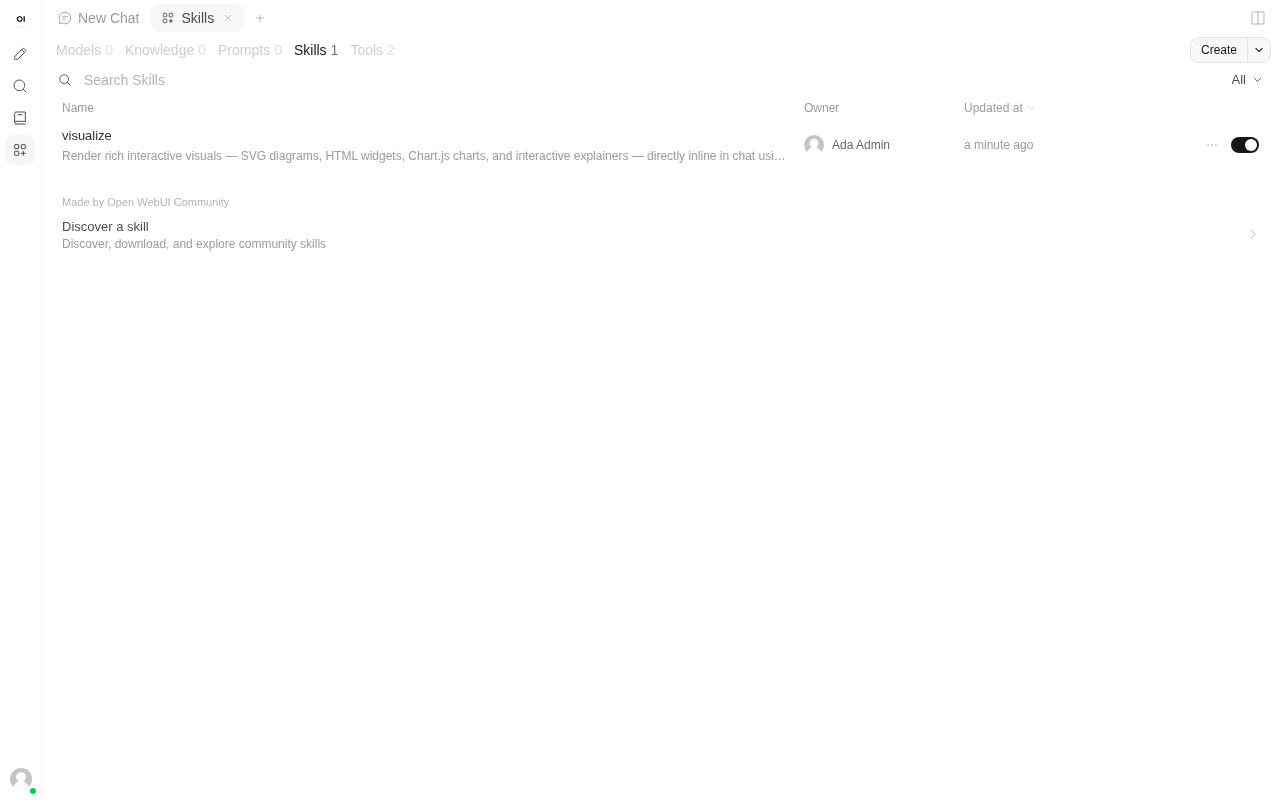
Workspace > Skills: the visualize skill, fetched from upstream at the pinned commit.
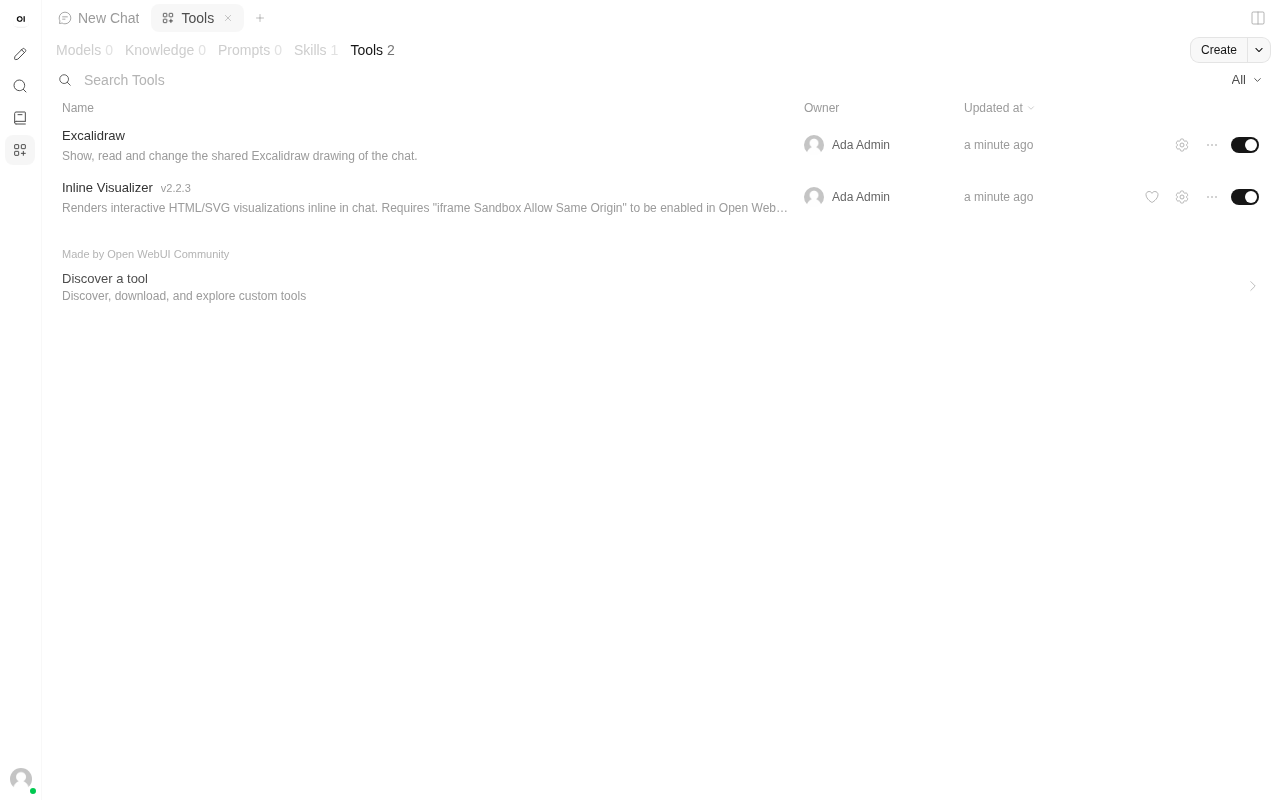
Workspace > Tools: the tools the Excalidraw and Inline Visualizer functions installed.
The installed tool is the upstream code
test_the_installed_tool_is_the_upstream_code
The installed tool is the upstream code: the model sees its render method, and it runs with its default valves.
By hand
In a chat with the tool on, ask the model to render a small HTML snippet. It calls render and the result shows inline.
Disabling removes both and enabling reinstalls them
test_disabling_removes_both_and_enabling_reinstalls_them
Disabling the function removes the tool and the skill; enabling it puts both back.
By hand
Switch the function off: Inline Visualizer is gone from Workspace > Tools and visualize from Workspace > Skills. Switch it on: both are back.
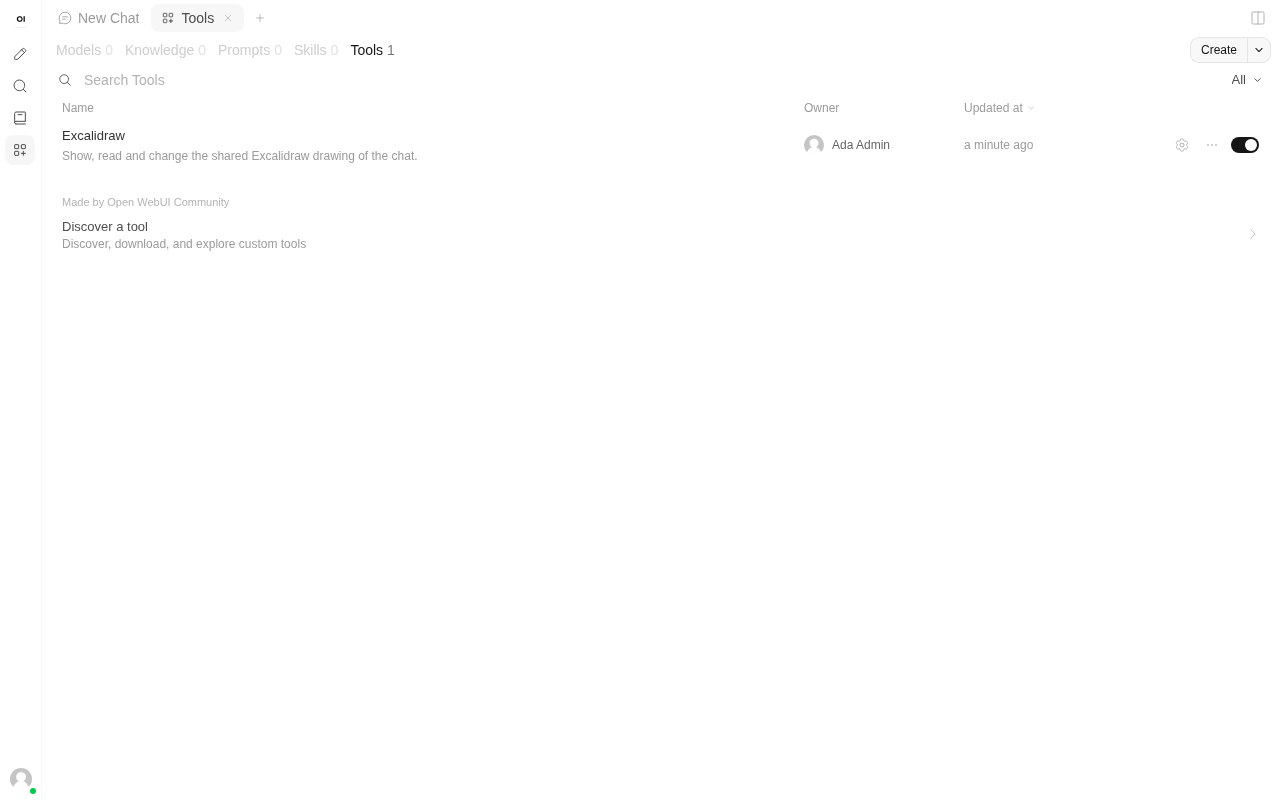
With the function switched off, its tool is gone from Workspace > Tools.
A new upstream commit updates them in place
test_a_new_upstream_commit_updates_them_in_place
When a new upstream commit is deployed, the tool and the skill are updated in place, and valves an admin set on the tool are kept.
By hand
Set one of the Inline Visualizer tool's valves, change the pinned commit in plugin.yaml and deploy. The tool's code is the new commit's, and your valve is still set.
Switching tools off in the valves removes only the tool
test_switching_tools_off_in_the_valves_removes_only_the_tool
With the function's INSTALL_TOOLS valve off, the tool is removed and the skill stays.
By hand
Turn INSTALL_TOOLS off in the function's valves and save. Inline Visualizer is gone from Workspace > Tools; visualize is still under Workspace > Skills.
litellm_model_sync
test_litellm_model_sync.py
LiteLLM Model Sync against a mock Open-WebUI and a stand-in LiteLLM gateway on localhost. Run with owpp test litellm_model_sync.
Each model gets its display name tags and vision
test_each_model_gets_its_display_name_tags_and_vision
Every model the gateway serves gets a model config under the id Open-WebUI gives it (prefix.name): its display name, vendor and family tags, the vision capability, and a public read grant so users can pick it.
By hand
Point an OpenAI connection at a LiteLLM gateway and save this function's valves. Admin Settings > Models shows the friendly names and tags, and a user who is not an admin sees the models in the selector.
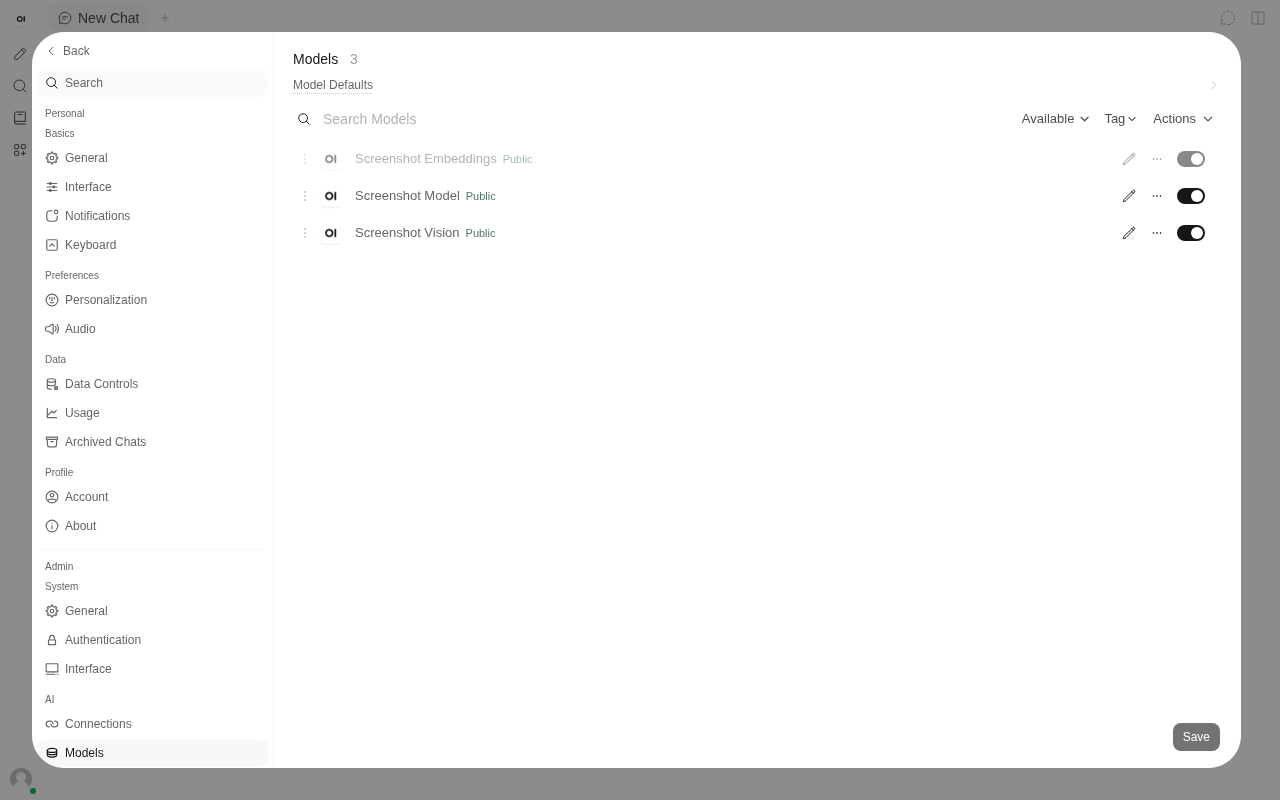
Admin Settings > Models after a sync: display names from the gateway, each readable by every user (Public), and the embedding model greyed out (hidden) but still on.
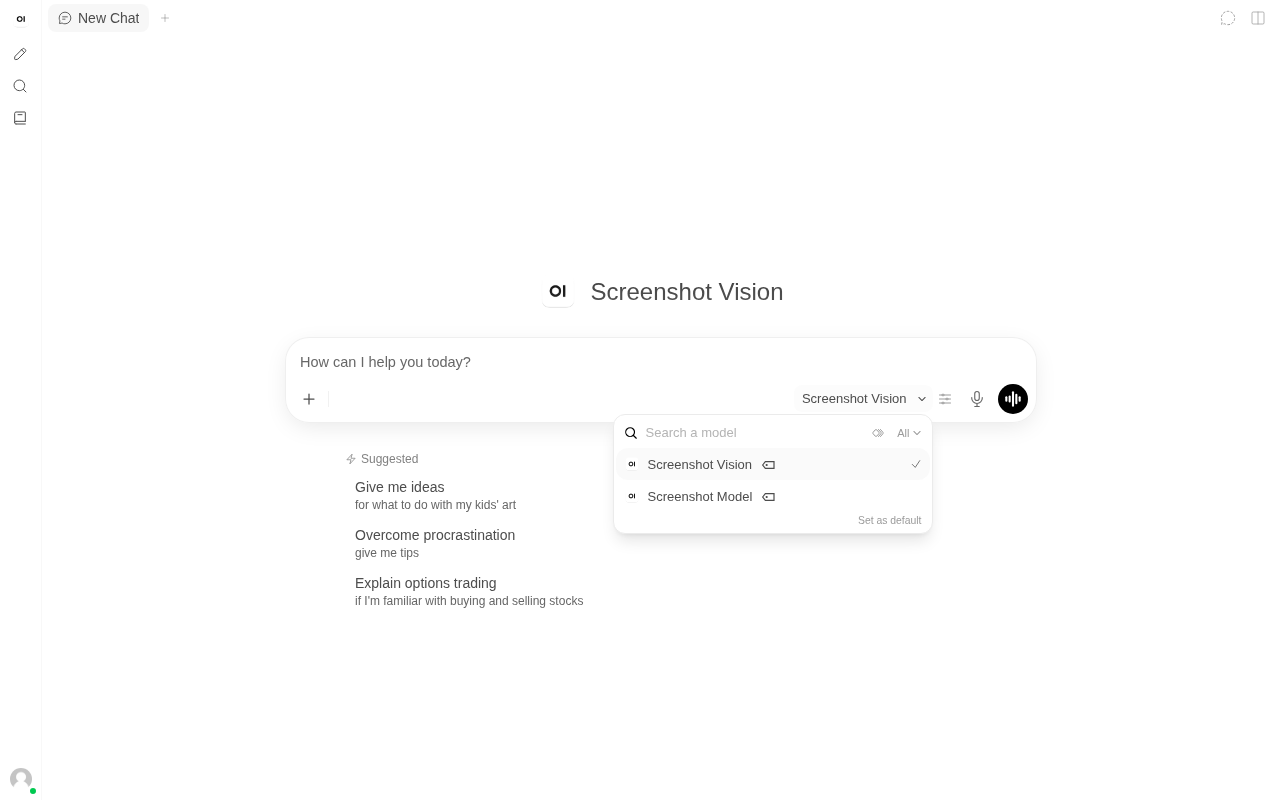
A user's model selector after a sync: the gateway's display name, readable by every user, and the embedding model hidden.
Non chat models are hidden but stay usable
test_non_chat_models_are_hidden_but_stay_usable
Embedding (and decision, transcription) models are hidden from the model selector, but stay enabled, so Open-WebUI can still call them.
By hand
After a sync, the embedding model is marked hidden in Admin Settings > Models and is missing from the chat's model selector, but it is still switched on.
Admin Settings > Models after a sync: display names from the gateway, each readable by every user (Public), and the embedding model greyed out (hidden) but still on.
A user's model selector after a sync: the gateway's display name, readable by every user, and the embedding model hidden.
A model on two providers is named by the first and needs both for a capability
test_a_model_on_two_providers_is_named_by_the_first_and_needs_both_for_a_capability
A name served by several deployments is named by the one tried first (the lowest order), and a capability counts only if every deployment has it.
By hand
Give a model two deployments with different orders in LiteLLM, one with vision and one without. After a sync it carries the first one's name and tags, and no vision.
Native function calling is only set when asked
test_native_function_calling_is_only_set_when_asked
NATIVE_FUNCTION_CALLING sets native tool calling on models that state tool support. It is off by default, because it changes how tool calls are made.
By hand
Turn NATIVE_FUNCTION_CALLING on and save. GPT Fast's advanced parameters show function calling: native; the others are unchanged.
Tags a person added are kept
test_tags_a_person_added_are_kept
Tags someone added by hand survive a sync; only the tags it wrote are replaced.
By hand
Add a tag to a synced model in Admin Settings > Models, then save this function's valves. Your tag is still there beside the synced ones.
Capability tags are optional
test_capability_tags_are_optional
TAG_CAPABILITIES also tags vision, tools and reasoning where a model states them.
By hand
Turn TAG_CAPABILITIES on and save. GPT Fast is tagged vision and tools too.
A config someone named by hand is left alone
test_a_config_someone_named_by_hand_is_left_alone
A model config someone renamed by hand is not overwritten, unless ADOPT_EXISTING is on. A config nobody named (still the raw id) is taken over either way.
By hand
Rename a model in Admin Settings > Models, then save this function's valves. Your name stays, and the log says it was left alone. Turn ADOPT_EXISTING on and save: it gets the gateway's name.
A model gone from the gateway is pruned
test_a_model_gone_from_the_gateway_is_pruned
A config it wrote whose model the gateway no longer serves is deleted; configs it did not write are not.
By hand
Remove a model from LiteLLM's config, restart it, and save this function's valves. That model's config is gone from Admin Settings > Models; one you made is kept.
An empty or failed answer deletes nothing
test_an_empty_or_failed_answer_deletes_nothing
An empty list, or an error from the gateway, is not taken to mean the models are gone.
By hand
Stop LiteLLM and save this function's valves. Every synced model is still in Admin Settings > Models, and the log says the gateway did not answer.
Connections that are not litellm are skipped
test_connections_that_are_not_litellm_are_skipped
A connection that does not answer /model/info (say, OpenAI itself) is skipped quietly, and INCLUDE_CONNECTIONS limits the sync to the connections it names.
By hand
With a second OpenAI connection that is not LiteLLM, save the valves. Only the gateway's models are written, and the log notes the other one has no /model/info.
Adopted markers count as its own
test_adopted_markers_count_as_its_own
With plugin.yaml's jobs: adopt_markers naming an earlier sync's marker, configs that sync wrote are updated and pruned like this function's own.
By hand
On an instance an earlier sync wrote to (marked, say, litellm-model-sync), add adopt_markers: [litellm-model-sync] under jobs: in plugin.yaml and deploy. Its configs take this function's marker, and those the gateway no longer serves are removed.
It gets its sync valves from the jobs library
test_it_gets_its_sync_valves_from_the_jobs_library
ENABLE and SYNC_INTERVAL_MINUTES come from the jobs library, after its own valves, and the interval defaults to 60 minutes (LITELLM_SYNC_MINUTES unset).
By hand
Open the function's valves. ENABLE and SYNC_INTERVAL_MINUTES (60) are last.
Switched off it does not call the gateway
test_switched_off_it_does_not_call_the_gateway
With ENABLE off, saving the valves does not call the gateway.
By hand
Turn ENABLE off and save. LiteLLM's log shows no /model/info request.
mcpo_sync
test_mcpo_sync.py
mcpo Sync against a mock Open-WebUI and a stand-in mcpo proxy on localhost. Run with owpp test mcpo_sync.
Saving the valves syncs every mcpo server as a tool server
test_saving_the_valves_syncs_every_mcpo_server_as_a_tool_server
Saving the valves adds each mcpo server as a tool server: id mcpo-<server>, URL <base>/<server> with openapi.json, bearer auth with the mcpo key, marked as managed by mcpo_sync.
By hand
Set MCPO_BASE_URL and MCPO_API_KEY in the function's valves and save. Admin Settings > Integrations > External Tool Servers lists one connection per mcpo server, each at <base>/<server> with bearer auth, and the log says mcpo Sync: N server(s) synced.
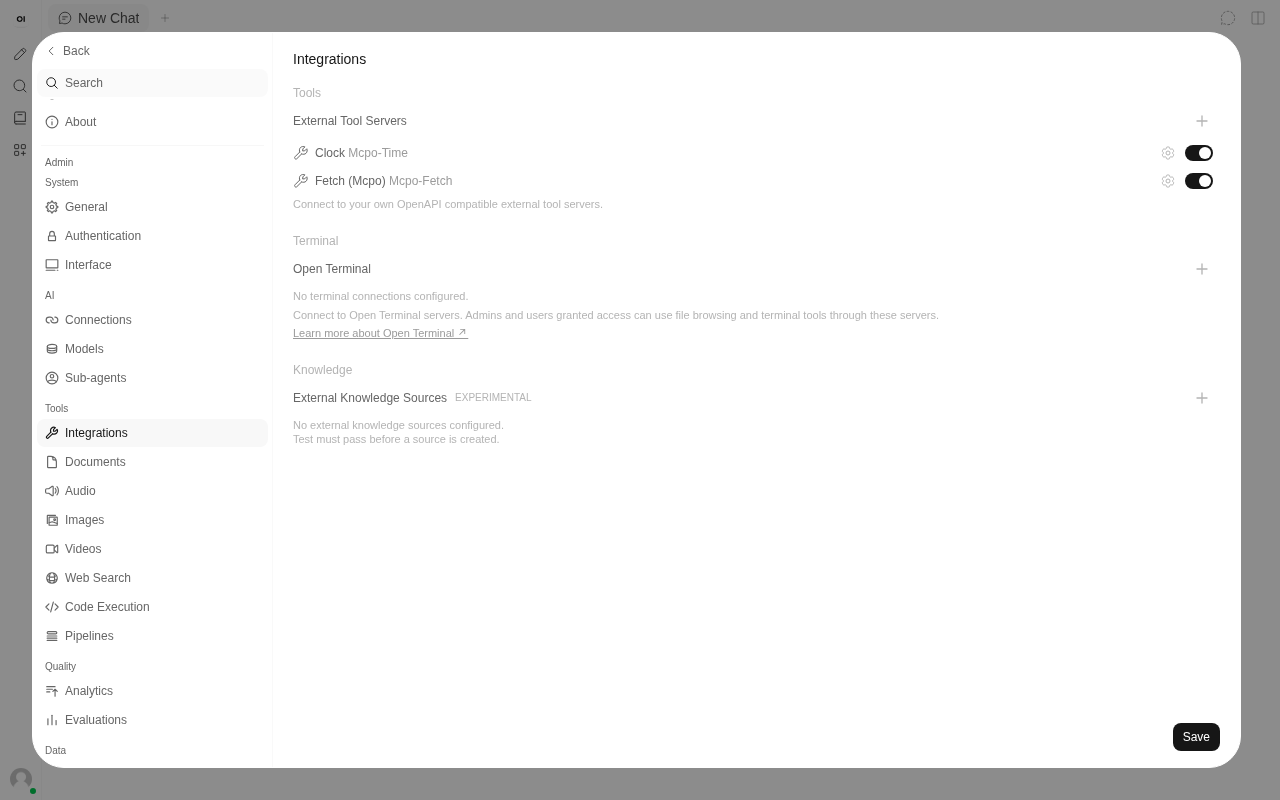
Admin Settings > Integrations: the mcpo servers, synced as tool servers. config.yaml renames "time" to Clock; "fetch" keeps the default name.
Startup syncs too and a server gone from mcpo is pruned
test_startup_syncs_too_and_a_server_gone_from_mcpo_is_pruned
It also syncs when Open-WebUI starts, and removes the connection of a server that mcpo no longer has.
By hand
Take a server out of mcpo's config, restart mcpo, then restart Open-WebUI. That server's connection is gone from External Tool Servers and the rest are still there.
Include and exclude pick the servers
test_include_and_exclude_pick_the_servers
INCLUDE_SERVERS limits the sync to the servers it lists, and EXCLUDE_SERVERS takes servers out again; exclude wins.
By hand
Set INCLUDE_SERVERS to "time, other" and EXCLUDE_SERVERS to "other", and save. Only mcpo-time is synced.
The key can come from the container
test_the_key_can_come_from_the_container
With the MCPO_API_KEY valve empty, the key comes from Open-WebUI's MCPO_API_KEY environment variable.
By hand
Leave the valve empty, set MCPO_API_KEY in Open-WebUI's environment, restart and save the valves. The servers are synced.
Without a key it does not call mcpo
test_without_a_key_it_does_not_call_mcpo
With no key anywhere, it does not call mcpo, writes nothing, and logs "MCPO_API_KEY not set".
By hand
Clear the valve and the variable, and save the valves. Nothing is added to External Tools, the log has the warning, and mcpo's log shows no request.
A refused key is logged and nothing is written
test_a_refused_key_is_logged_and_nothing_is_written
If mcpo refuses the key, the error (HTTP 401) is logged and the tool servers, including hand-made ones, are left as they were.
By hand
Add a connection by hand under External Tool Servers, set a wrong MCPO_API_KEY and save. The log shows HTTP 401 and your connection is untouched.
Switched off it does nothing
test_switched_off_it_does_nothing
With ENABLE off, it does not contact mcpo, even at startup.
By hand
Turn ENABLE off, save, and restart Open-WebUI. mcpo's log shows no request from it.
Another functions valves do not trigger it
test_another_functions_valves_do_not_trigger_it
Saving another function's valves does not start a sync.
By hand
Save the valves of some other function. mcpo's log shows no request.
With an interval it schedules a repeat
test_with_an_interval_it_schedules_a_repeat
SYNC_INTERVAL_MINUTES above 0 schedules a repeating sync; 0 cancels it.
By hand
Set SYNC_INTERVAL_MINUTES to 1 and save: mcpo Sync: N server(s) synced appears in the log every minute. Set it to 0: it stops.
It applies the config it ships
test_it_applies_the_config_it_ships
The sync applies config.yaml: time is renamed Clock, with its description, and enabled; filesystem is disabled but keeps the default name "filesystem (mcpo)"; a server config.yaml does not mention gets "<server> (mcpo)", "<server> MCP server via mcpo (OpenAPI)" and is enabled.
By hand
After a sync, compare External Tool Servers with config.yaml: the names, descriptions and on/off switches match.
Admin Settings > Integrations: the mcpo servers, synced as tool servers. config.yaml renames "time" to Clock; "fetch" keeps the default name.
The default enable comes from the container
test_the_default_enable_comes_from_the_container
MCPO_SERVERS_ENABLED=false makes the servers config.yaml does not mention start switched off.
By hand
Set MCPO_SERVERS_ENABLED=false in Open-WebUI's environment, restart and sync. The servers config.yaml does not mention are listed, switched off.
A changed config changes what is synced
test_a_changed_config_changes_what_is_synced
Editing config.yaml changes the sync: a top-level enable: false switches every server off by default, and a server's own entry can switch it on and rename it.
By hand
Change config.yaml to the text above, deploy, and save the valves. mcpo-time is off, and mcpo-other is on and named Other.
A malformed servers entry is ignored not fatal
test_a_malformed_servers_entry_is_ignored_not_fatal · 2 cases
A servers: that is a list, or a server given as a plain string, is ignored rather than breaking the sync, and the defaults apply.
By hand
Put servers: [time, filesystem] in config.yaml, deploy and save the valves. The sync works and the names are the defaults ("time (mcpo)").
An empty config leaves the defaults
test_an_empty_config_leaves_the_defaults
With an empty config.yaml, every server is enabled with the default name.
By hand
Empty config.yaml, deploy and sync. Every server is on, named "<server> (mcpo)".
It gets its sync valves from the jobs library
test_it_gets_its_sync_valves_from_the_jobs_library
Its own valves come first, in order, then ENABLE and SYNC_INTERVAL_MINUTES from the jobs library. With MCPO_SYNC_MINUTES unset, the interval defaults to 60.
By hand
Open the function's valves. MCPO_BASE_URL to REQUEST_TIMEOUT come first, ENABLE and SYNC_INTERVAL_MINUTES (60) last.
The interval default comes from the container
test_the_interval_default_comes_from_the_container
MCPO_SYNC_MINUTES in Open-WebUI's environment sets the default interval.
By hand
Set MCPO_SYNC_MINUTES=15 and restart. On a function whose valves were never saved, SYNC_INTERVAL_MINUTES shows 15.
The interval default comes from the manifest
test_the_interval_default_comes_from_the_manifest
The default interval can also be written into plugin.yaml in place of ${MCPO_SYNC_MINUTES:-60}.
By hand
Replace it with 15 in plugin.yaml and deploy. On a function whose valves were never saved, SYNC_INTERVAL_MINUTES shows 15.
It prunes only what it wrote
test_it_prunes_only_what_it_wrote
When it writes the synced servers, it removes only its own (managed_by: mcpo_sync) that mcpo no longer has, replaces its current ones, and keeps hand-made ones and other functions' ones.
By hand
Add a connection by hand under External Tool Servers and sync. Then take a server out of mcpo and sync again: that server's connection is gone, yours is still there.
Without pruning a stale entry of its own is kept
test_without_pruning_a_stale_entry_of_its_own_is_kept
With PRUNE_MANAGED off, its own connection for a server that left mcpo is kept.
By hand
Turn PRUNE_MANAGED off, take a server out of mcpo and sync. That server's connection is still listed.
A hand made entry with a synced id is replaced not duplicated
test_a_hand_made_entry_with_a_synced_id_is_replaced_not_duplicated
A hand-made connection with the same id as a synced one is replaced by it, not duplicated.
By hand
Under External Tool Servers add a connection with the id mcpo-time, then sync. There is one mcpo-time, the synced one.
It will not sync when it cannot tell which function it is
test_it_will_not_sync_when_it_cannot_tell_which_function_it_is
Loaded under a module name Open-WebUI would never use, it has no function id, so it refuses to sync ("cannot tell which function this is") rather than prune every hand-made connection.
By hand: not a live check
Not repeatable: Open-WebUI always loads a function under its own function id.
Adopted markers are pruned and replaced like its own
test_adopted_markers_are_pruned_and_replaced_like_its_own
With plugin.yaml's jobs: adopt_markers naming an earlier sync's markers, that sync's entries count as this function's: a stale one is pruned, one with a synced id is replaced, and entries of any other marker are left alone.
By hand
With tool servers left by an earlier sync (marked, say, mcpo-sync), add adopt_markers: [mcpo-sync] under jobs: in plugin.yaml and deploy. Its entries for servers mcpo still has are replaced by synced ones, the rest are removed, and hand-made entries stay.
Without adopt markers another syncs entries are kept
test_without_adopt_markers_another_syncs_entries_are_kept
By default nothing is adopted: an earlier sync's entries stay unless their id collides with a synced server.
By hand
With no adopt_markers in plugin.yaml, sync. Entries another sync wrote are still listed, except one with the same id as a synced server, which is replaced.
page_banners
test_page_banners.py
Page Banners against a mock Open-WebUI: its script and stylesheet are assets/ files, served through the Shared Assets Protocol. Run with owpp test page_banners.
The script and the stylesheet are published into the shared files
test_the_script_and_the_stylesheet_are_published_into_the_shared_files
At startup, its script and stylesheet are published into /static/loader.js and /static/custom.css, each in its own owui:page_banners block, served as JavaScript and CSS.
By hand
Open <host>/static/loader.js and <host>/static/custom.css. Each has an owui:page_banners:start block, and the network tab shows loader.js as application/javascript.
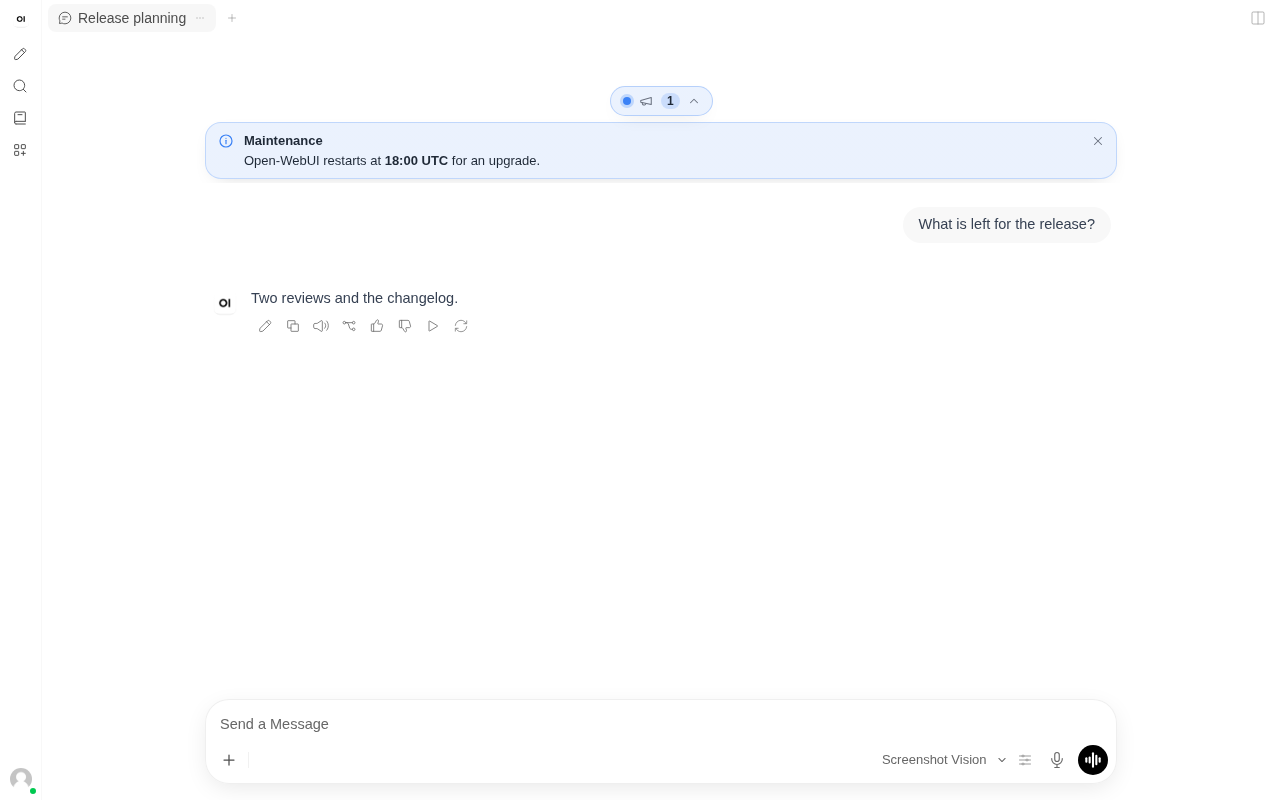
An admin banner at the top of an existing chat, where Open-WebUI itself shows none.
They are served to everyone who loads the page
test_they_are_served_to_everyone_who_loads_the_page
The files need no sign-in, because the sign-in page loads them too.
By hand
In a private window, open <host>/static/loader.js. It loads.
The valves reach the script as its config
test_the_valves_reach_the_script_as_its_config
The valves reach the script as its CFG (by default top, 160 and 300), and a change shows up in the served script.
By hand
Open /static/loader.js and find var CFG = {...}. Set position to bottom and max_height_px to 240 in the function's valves, save and reload: CFG has the new values, and banners show above the message input.
An admin banner at the top of an existing chat, where Open-WebUI itself shows none.
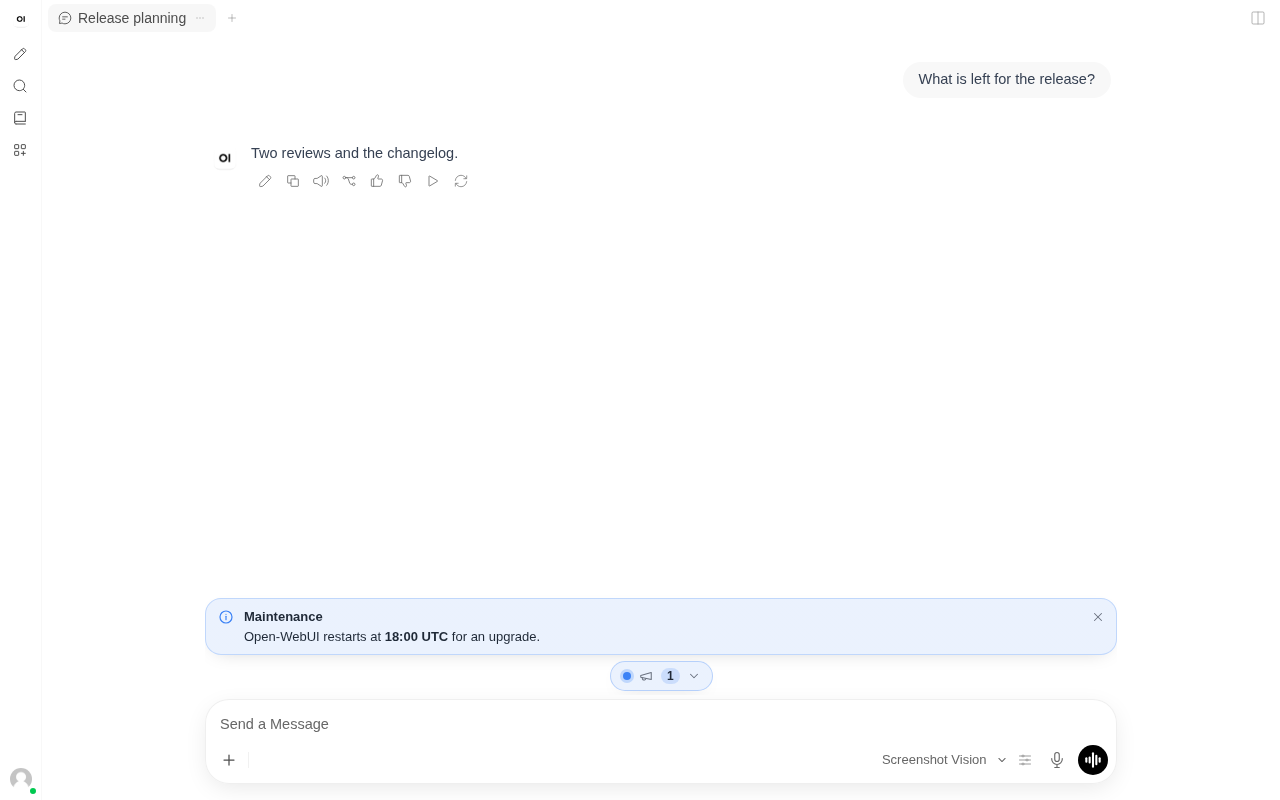
With the position valve set to bottom, the banner sits above the message input.
A valve out of range is refused
test_a_valve_out_of_range_is_refused
max_height_px below its minimum (60) is refused.
By hand
Set max_height_px to 10 and save. Open-WebUI refuses the valves.
The file on disk is kept and its block goes after it
test_the_file_on_disk_is_kept_and_its_block_goes_after_it
A custom.css already in Open-WebUI's static folder is kept, with the plugin's block after it.
By hand
Put body { color: red; } in the static folder's custom.css and restart. /static/custom.css starts with your rule, followed by the owui:page_banners block.
The script runs inside a try catch the stylesheet is plain
test_the_script_runs_inside_a_try_catch_the_stylesheet_is_plain
The script runs inside a try/catch, so an error in it cannot break the page; the stylesheet has no wrapper.
By hand
Read /static/loader.js: its block ends in } catch (e) {. /static/custom.css has no catch.
Disabling it withdraws both and enabling brings them back
test_disabling_it_withdraws_both_and_enabling_brings_them_back
Disabling the function takes its blocks out of both files; enabling puts them back.
By hand
Switch the function off and open both files: no owui:page_banners block. Switch it on: the blocks are back.
An admin edit is pushed to open tabs
test_an_admin_edit_is_pushed_to_open_tabs
When an admin edits the banners, open tabs are told over the socket (owui:page-banners).
By hand
Keep a chat open in one tab and add a banner under Admin Panel > Settings > General in another. It appears in the first tab without a reload.
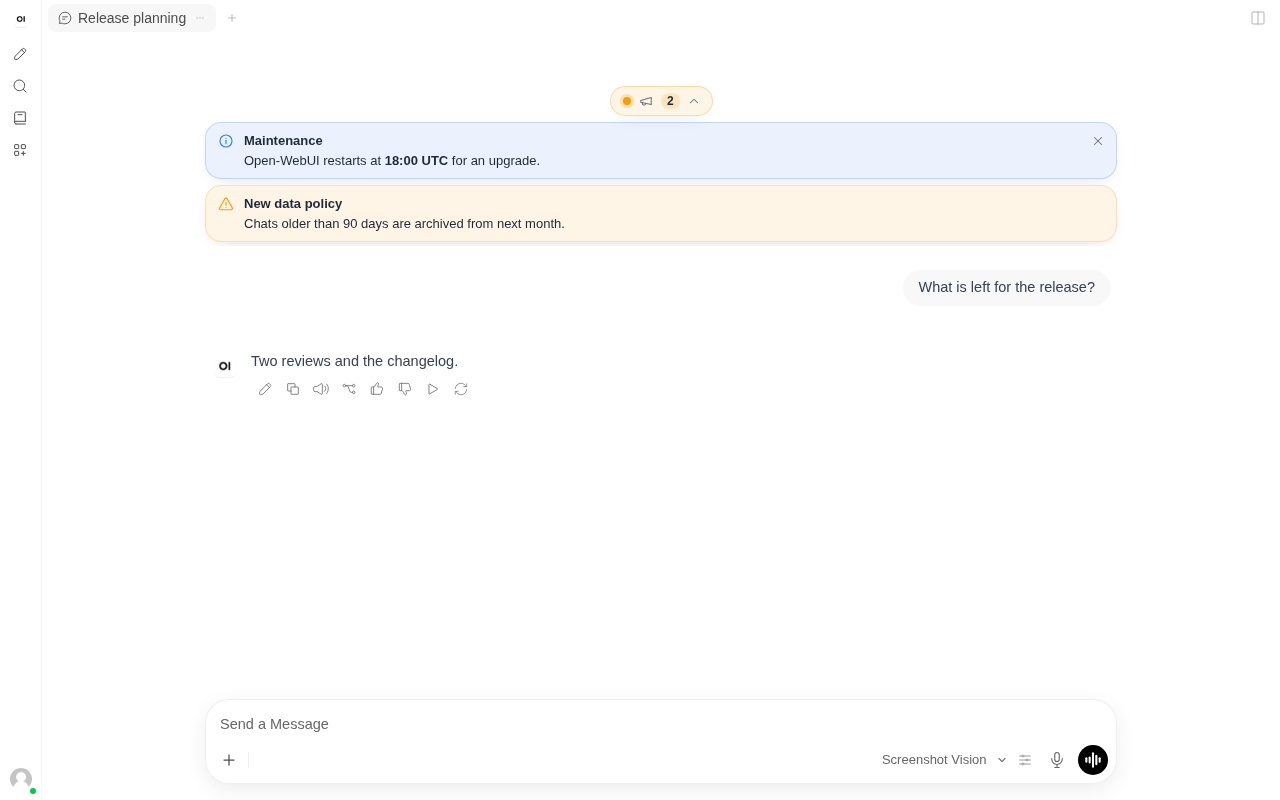
A second banner, added by an admin while this chat was open, appears without a reload.
An unchanged file is answered with not modified
test_an_unchanged_file_is_answered_with_not_modified
Asking again for an unchanged file, with its ETag, gets 304 Not Modified.
By hand
Load /static/loader.js twice with the network tab open and the cache on. The second answer is 304.
The script file is only a body and is wrapped once
test_the_script_file_is_only_a_body_and_is_wrapped_once
assets/loader.js holds only the script's body; owpp adds the wrapper, with "use strict" and the try, exactly once.
By hand
Assets/loader.js neither starts with (function nor contains use strict. The served /static/loader.js has "use strict" once, followed by try { and the file's // Page Banners header.
It can sit beside better banners
test_it_can_sit_beside_better_banners
None of Better Banners' ids, classes or socket event are left, so the two can run side by side.
By hand
grep -rE 'owui-better-banners|obb-|owui:better-banners|__owuiBetterBanners' assets function.py finds nothing. Or install both: each shows its banners.
stale_data
test_stale_data.py
The Stale Data Dashboard against a mock Open-WebUI. Run with owpp test stale_data.
Only admins see it
Signed out, a client gets 401 (a browser is sent to sign in); a user who is not an admin gets 403; an admin gets the dashboard.
By hand
Open /stale-data in a private window: the sign-in page. As a user who is not an admin: 403, "Admins only.". As an admin: the dashboard.
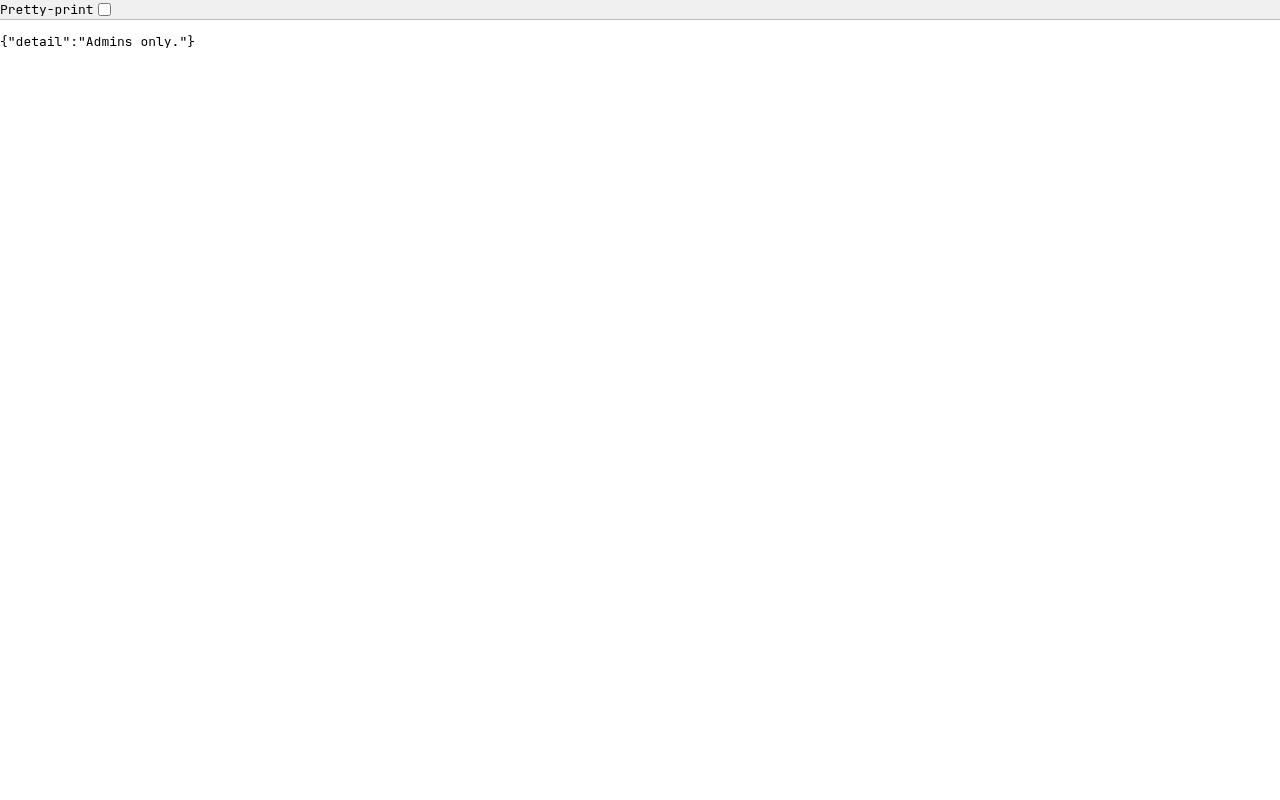
A user who is not an admin gets 403, "Admins only.".
It is gone once the function is disabled
test_it_is_gone_once_the_function_is_disabled
Once the function is disabled, the dashboard is gone.
By hand
Switch the function off and reload /stale-data as an admin: 404.
Nothing is mounted until open webui has started
test_nothing_is_mounted_until_open_webui_has_started
Until Open-WebUI has finished starting, /stale-data is still Open-WebUI's own web app.
By hand: not a live check
Hard to catch: it only lasts between the function loading and startup finishing.
A new path moves the page
test_a_new_path_moves_the_page
Changing DASHBOARD_PATH moves the page, and the old path goes back to Open-WebUI's web app.
By hand
Set DASHBOARD_PATH to /admin/stale and save. /admin/stale shows the dashboard and /stale-data shows Open-WebUI.
It lists what is older than the threshold and not the rest
test_it_lists_what_is_older_than_the_threshold_and_not_the_rest
Chats, notes and files older than the threshold are listed, with their owners' names, file sizes, and pinned chats marked; newer ones are not. A line says how many of each were scanned.
By hand
On an instance with chats, notes and files older than STALE_THRESHOLD_HOURS, open the dashboard. The old ones are listed with their owners, a pinned chat is marked pinned, newer ones are missing, and the Scanned ... line matches what there is.
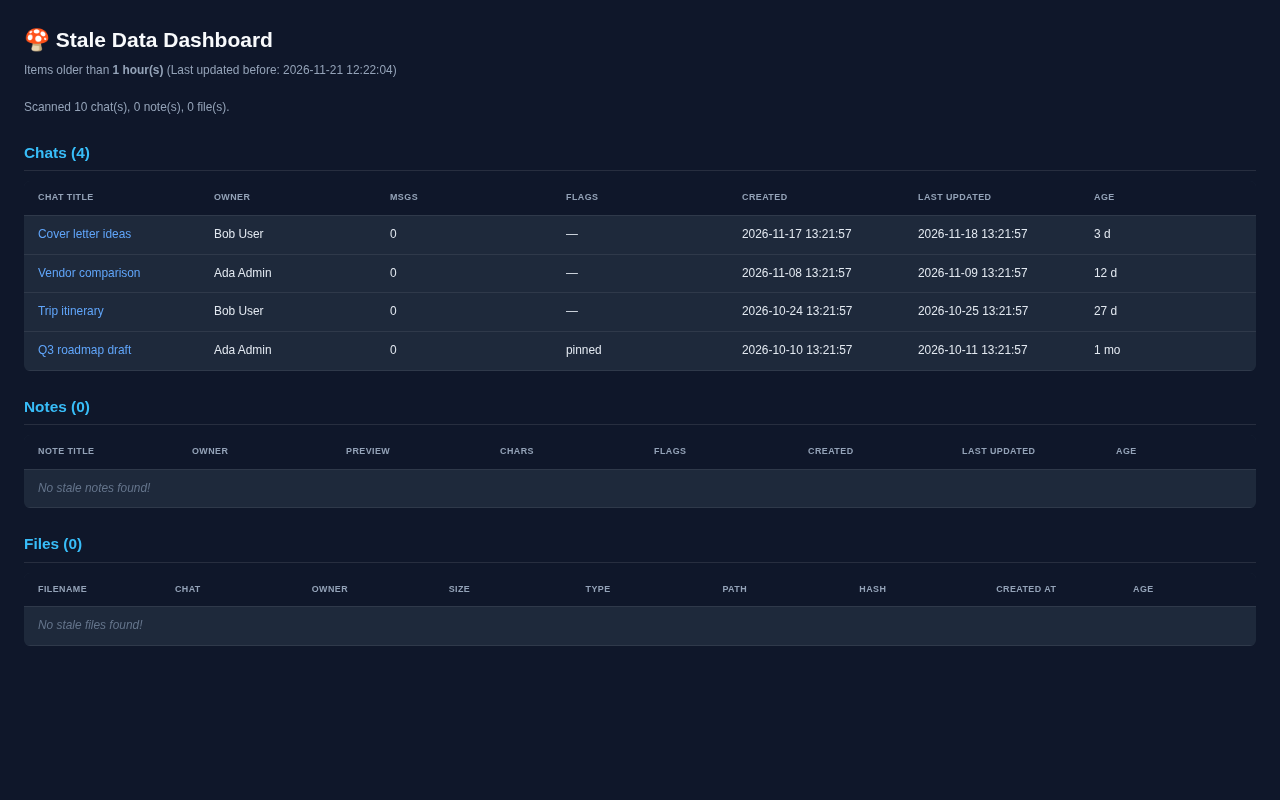
The dashboard as an admin: chats older than the threshold, with owners, flags and age. The fresh chat is not listed.
The threshold is a valve read again after a few seconds
test_the_threshold_is_a_valve_read_again_after_a_few_seconds
STALE_THRESHOLD_HOURS (default 1) sets how old is stale. The page keeps its read of the valves for 5 seconds, so a change shows up after that.
By hand
With a chat last changed two hours ago, open the dashboard: it is listed. Set STALE_THRESHOLD_HOURS to 24 and save, wait 5 seconds and reload: it is gone.
A file names the chats it is attached to
test_a_file_names_the_chats_it_is_attached_to
A file's row names the chats it is attached to.
By hand
Attach an old file to a chat. On the dashboard, that file's row names the chat.
Titles are escaped
Titles are escaped, so a title cannot inject HTML or script into the page.
By hand
Rename an old chat to <script>alert(1)</script>. The dashboard shows that text, and no alert pops up.
A title that looks like a placeholder is shown as it is
test_a_title_that_looks_like_a_placeholder_is_shown_as_it_is
A title that looks like one of the page's own placeholders (__N_NOTES__) is shown as it is, not filled in.
By hand
Rename an old chat to __N_NOTES__. The dashboard shows __N_NOTES__.
With nothing stale it says so
test_with_nothing_stale_it_says_so
With nothing stale, the page says so.
By hand
Set STALE_THRESHOLD_HOURS very high and open the dashboard: "No stale chats found!" and "No stale notes found!".
theme_designer_pro
test_tdp_consultant.py
Theme Designer Pro's AI Consultant: a description in words, a model on the instance, a palette back. Run with owpp test theme_designer_pro. The mock's model answers owui.model_reply and keeps what it was asked in owui.completions.
The consultant turns a description into a palette
test_the_consultant_turns_a_description_into_a_palette
The consultant asks the model named by ai_consultant_model for a palette and answers it range-checked, with the model's name.
By hand
Set AI Consultant Model to a model's id. In the designer, open the AI Consultant, describe "a calm harbour at night" and press Generate: the palette changes to it.
Without a model to ask the consultant says where to set one
test_without_a_model_to_ask_the_consultant_says_where_to_set_one
With no AI Consultant Model and no task model, or one the instance does not have, the consultant says where to set one.
By hand
Leave AI Consultant Model empty with no task model under Admin Settings > Interface, and press Generate: the designer shows where to set one.
With no model set the task model is asked
test_with_no_model_set_the_task_model_is_asked
Empty AI Consultant Model asks Open-WebUI's task model, with its task parameters, as Open-WebUI's own background tasks do.
By hand
Set a task model under Admin Settings > Interface and leave AI Consultant Model empty: Generate works.
One person asks at most every few seconds
test_one_person_asks_at_most_every_few_seconds
One person's requests are consult_interval_seconds apart (config.yaml, 3 by default), counted on every worker: a second one sooner is refused.
By hand
Press Generate twice quickly: the second says "Wait a few seconds between requests".
The models answer is checked
test_the_models_answer_is_checked · 3 cases
The model's answer is read past any thinking, clamped to the designer's ranges, and an answer with no palette in it is a 502 the designer shows.
By hand: not a live check
Not repeatable on purpose; with a weak model, an odd answer shows "The model's answer had no theme in it".
A model that fails is a 502
test_a_model_that_fails_is_a_502
A model that errors is a 502, and a pipeline filter that refuses is a 400.
By hand
Point AI Consultant Model at a model whose connection is down: Generate says "The model could not answer".
The consultant can be turned off
test_the_consultant_can_be_turned_off
With enable_ai_consultant off nobody can ask, admins included.
By hand
Turn Enable Ai Consultant off: the designer has no AI Consultant.
Users ask only when they can have a personal theme
test_users_ask_only_when_they_can_have_a_personal_theme
Users design only their own themes, so they ask only while personal themes are on; signed out, nobody asks; an empty description asks nothing.
By hand
With Allow Personal Themes on, a user's Themes tab has the AI Consultant.
test_tdp_designer.py
Theme Designer Pro's designer page: who opens it, which theme it edits, and what the valves tell it. Run with owpp test theme_designer_pro.
An admin opens the designer on the instance theme
test_an_admin_opens_the_designer_on_the_instance_theme
An admin opens the designer at its URL; it edits the theme every user sees, and is never cached.
By hand
As an admin, open /api/v1/theme-designer. The designer opens on the Themes tab, with "Theme Designer Pro | v1.22.0" in its footer.
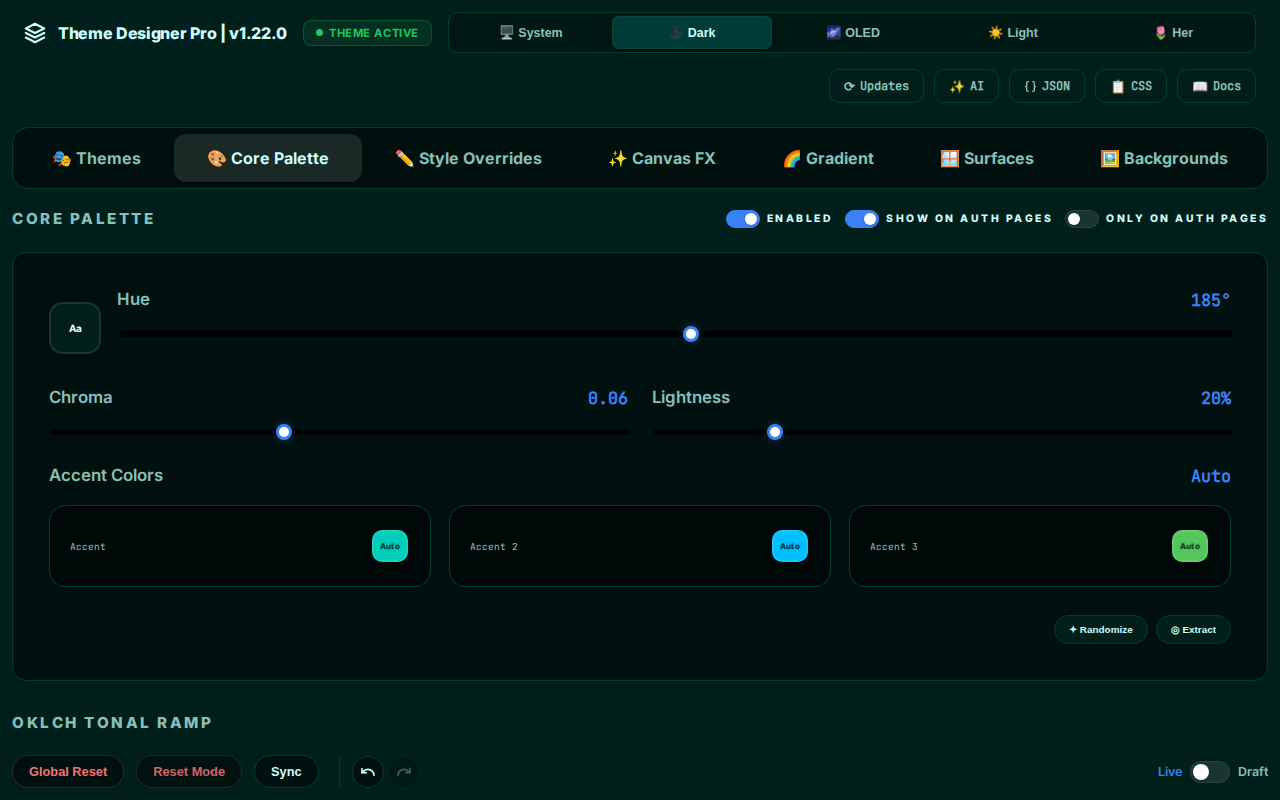
The designer's Core Palette tab, after moving Hue and Chroma: the ramp of Open-WebUI's greys it makes, saved for everyone at once in Live mode. The page is templates/designer/, put together from thirty files.
A user who is not an admin cannot open the instance designer
test_a_user_who_is_not_an_admin_cannot_open_the_instance_designer
The instance designer is for admins: a user is refused.
By hand
As a user who is not an admin, open /api/v1/theme-designer. The page answers {"detail": "Admins only."}.
Someone signed out is sent to sign in first
test_someone_signed_out_is_sent_to_sign_in_first
Opening the designer without a session goes to Open-WebUI's sign-in page, which brings the person back to the designer; a fetch with no session gets a 401.
By hand
In a private window, open /api/v1/theme-designer. The sign-in page opens; after signing in as an admin, the designer opens.
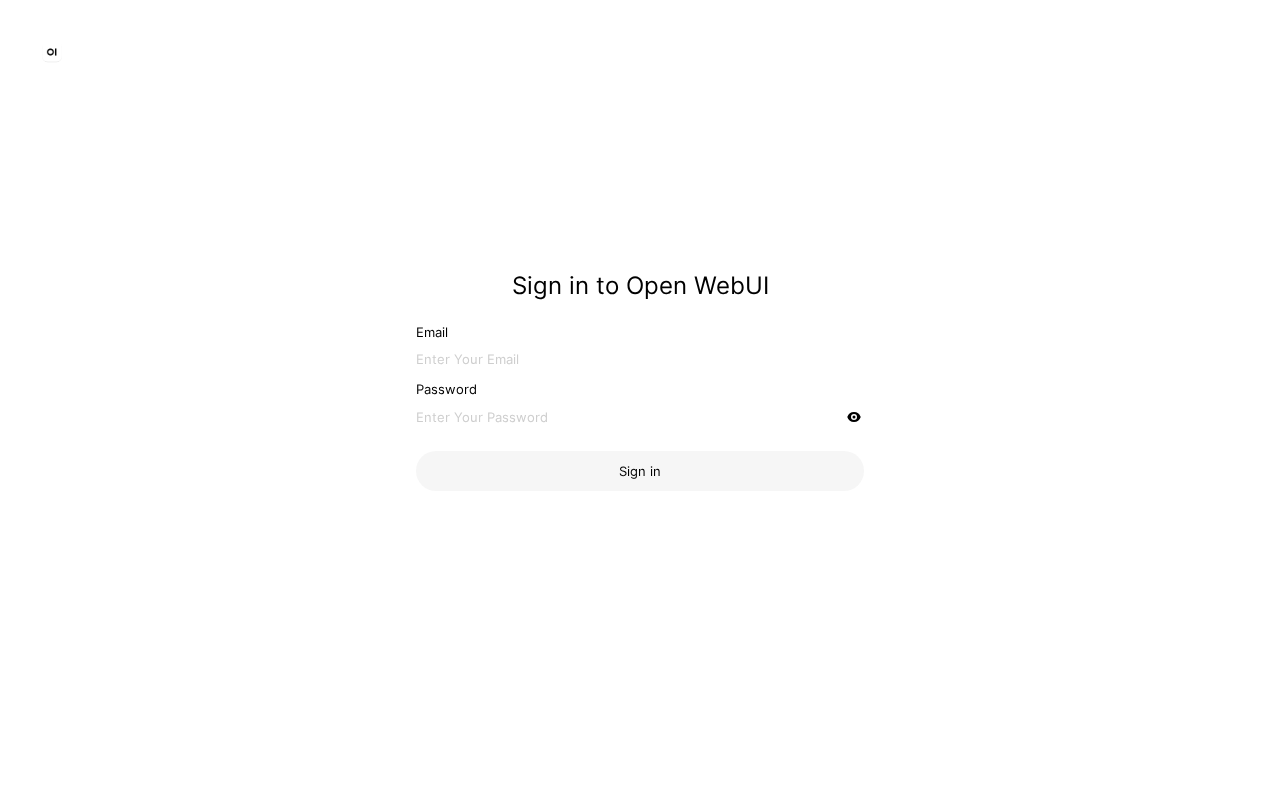
Signed out, owpp's guard sends the designer's visitor to Open-WebUI's sign-in page.
With personal themes off a user gets a sentence not the designer
test_with_personal_themes_off_a_user_gets_a_sentence_not_the_designer
allow_personal_themes is off by default: the personal designer (?scope=me) answers a short page saying so in a frame, and JSON to a fetch.
By hand
As a user, open /api/v1/theme-designer?scope=me. The page says "Personal themes are turned off on this instance."
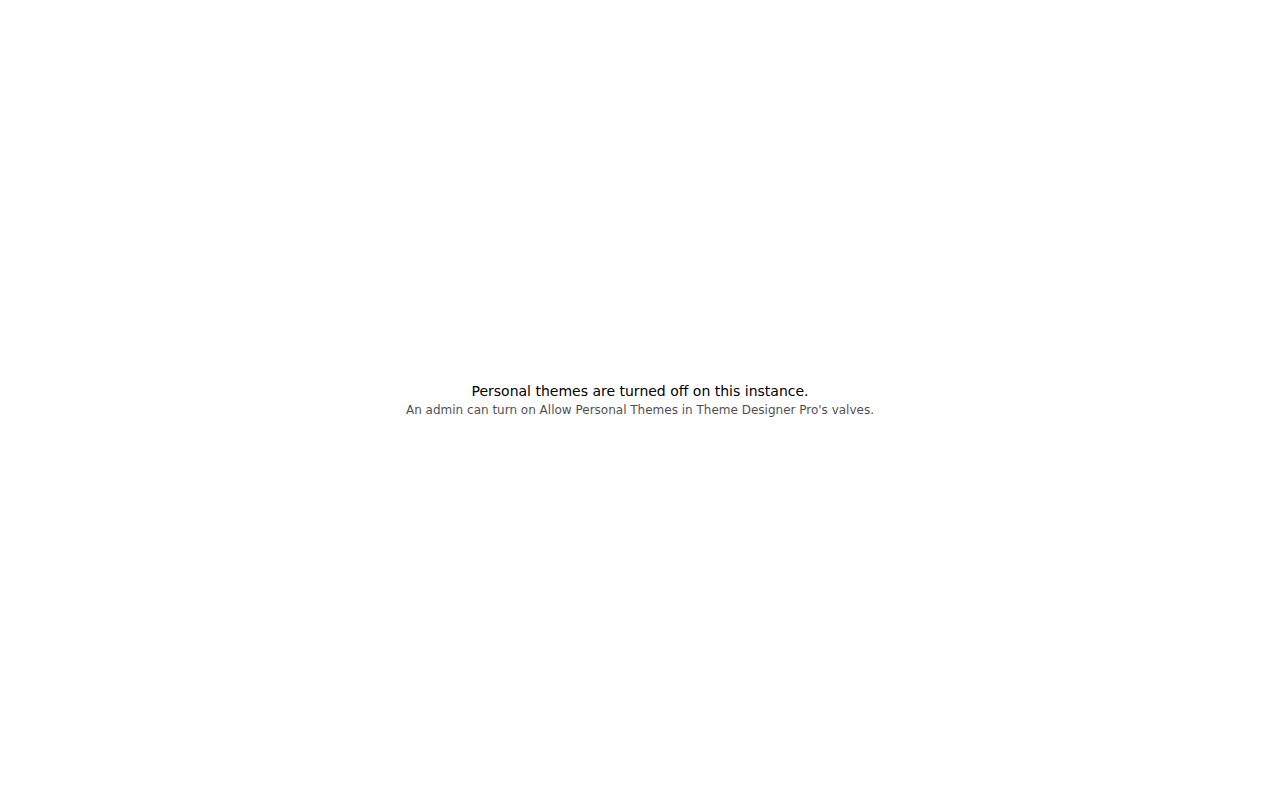
Personal themes off (the default): a user's designer link answers with a sentence.
With personal themes on a user designs their own theme
test_with_personal_themes_on_a_user_designs_their_own_theme
With allow_personal_themes on, ?scope=me opens the designer on the user's own theme: marked personal from its first line, saving to /me, with its own storage keys, and never in Draft mode.
By hand
Turn on Allow Personal Themes. As a user, open Settings: a Themes tab opens the designer, saying it edits your own theme.
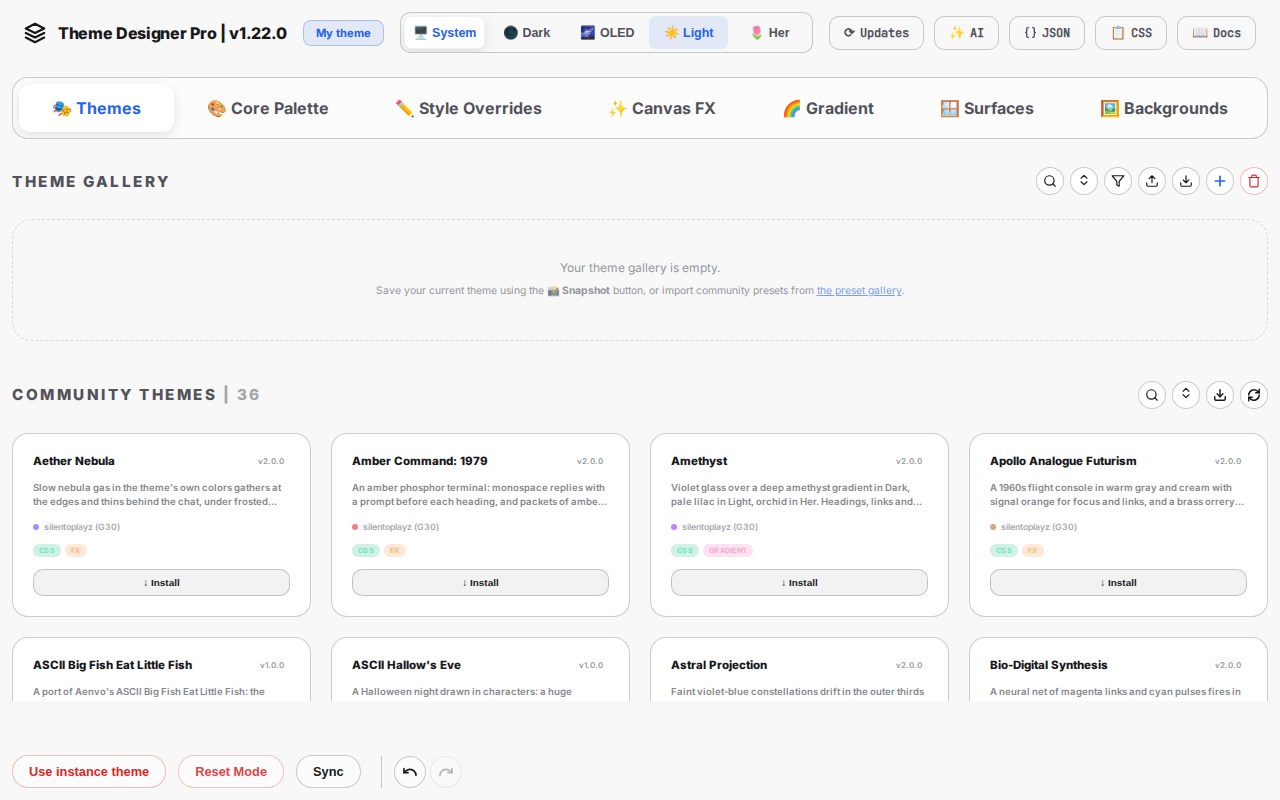
With Allow Personal Themes on, a user's own designer, starting from the instance theme: the instance-only controls are gone, and saves change only their theme.
The designer starts from the theme the server serves
test_the_designer_starts_from_the_theme_the_server_serves
The designer starts from the saved theme and gallery, not from a copy the browser kept that another browser's save may have overtaken.
By hand
Save a theme in one browser, then open the designer in another. It shows that theme.
A personal designer starts from the instance theme without its gallery marks
test_a_personal_designer_starts_from_the_instance_theme_without_its_gallery_marks
A user with no theme of their own starts from the instance theme, less the marks naming entries of the admin's gallery, which would pick unrelated entries of theirs.
By hand
With Allow Personal Themes on and an instance theme saved from a gallery entry, a user opens their Themes tab: it shows the instance theme, and no gallery entry is marked.
Each valve reaches the designer
test_each_valve_reaches_the_designer · 15 cases
Each valve that shapes the designer reaches its page, which shows or hides its part: Enable Canvas FX the Canvas FX tab, Enable Custom CSS the Style Overrides tab, Enable Gradient Builder the Gradient tab, Enable Url Import the Load from URL controls, Enable Community Themes the community grid, Enable Theme Update Checks the Updates button, Enable Auth Page Theming the sign-in toggles, Auto Sync the Sync All switch, Draft Mode Default the mode it opens in, and Enable Ai Consultant the AI Consultant.
By hand
Change the valve (Admin Panel > Functions > Theme Designer Pro > Valves), reload the designer: the part it names is shown or hidden, as its description says.
The designer's Core Palette tab, after moving Hue and Chroma: the ramp of Open-WebUI's greys it makes, saved for everyone at once in Live mode. The page is templates/designer/, put together from thirty files.
Translucent overlays make the settings tab glass
test_translucent_overlays_make_the_settings_tab_glass
With overlay_transparency translucent, the designer inside Settings drops its own background, so the dialog's glass shows through.
By hand
Set Overlay Transparency to translucent and open Settings > Themes: the dialog's frosted glass shows behind the designer.
The designer carries the bootloader set for its previews
test_the_designer_carries_the_bootloader_set_for_its_previews
The designer embeds the bootloader its previews run, on and with the designer's own URL, and with no theme of its own (the designer applies the one it edits).
By hand: not a live check
Not repeatable as such; in the designer, the live preview shows the theme being edited, with Canvas FX running when Enable Canvas FX is on.
The page is its files put together
test_the_page_is_its_files_put_together
The designer is templates/designer/page.html with each file it includes put in its place, every one of them once, and nothing left to include.
By hand: not a live check
Not repeatable in Open-WebUI; compare the page the designer serves with templates/designer/ (view the frame's source).
The designer's Core Palette tab, after moving Hue and Chroma: the ramp of Open-WebUI's greys it makes, saved for everyone at once in Live mode. The page is templates/designer/, put together from thirty files.
test_tdp_install.py
What Theme Designer Pro installs when it is enabled: the Launcher tool and the theme-designer-pro skill, for every signed-in user, removed again when it is disabled. Run with owpp test theme_designer_pro.
Enabling it installs the launcher and the skill for everyone
test_enabling_it_installs_the_launcher_and_the_skill_for_everyone
The function installs the Launcher and the skill, with all of the skill's files (it points to its references and templates), readable by every signed-in user.
By hand
Enable the function. Workspace > Tools has Theme Designer Pro Launcher and Workspace > Skills has theme-designer-pro, both shown to a user who is not an admin.
Disabling it removes the launcher and the skill
test_disabling_it_removes_the_launcher_and_the_skill
Disabling the function removes what it installed.
By hand
Disable the function: the Launcher and the skill are gone from Workspace.
The launcher carries only its own templates
test_the_launcher_carries_only_its_own_templates
The Launcher's bundle has its card and frame (tool: templates: [launcher/]), and not the 1 MB designer page, which only the function serves.
By hand
Workspace > Tools > Theme Designer Pro Launcher: its code is about 80 KB.
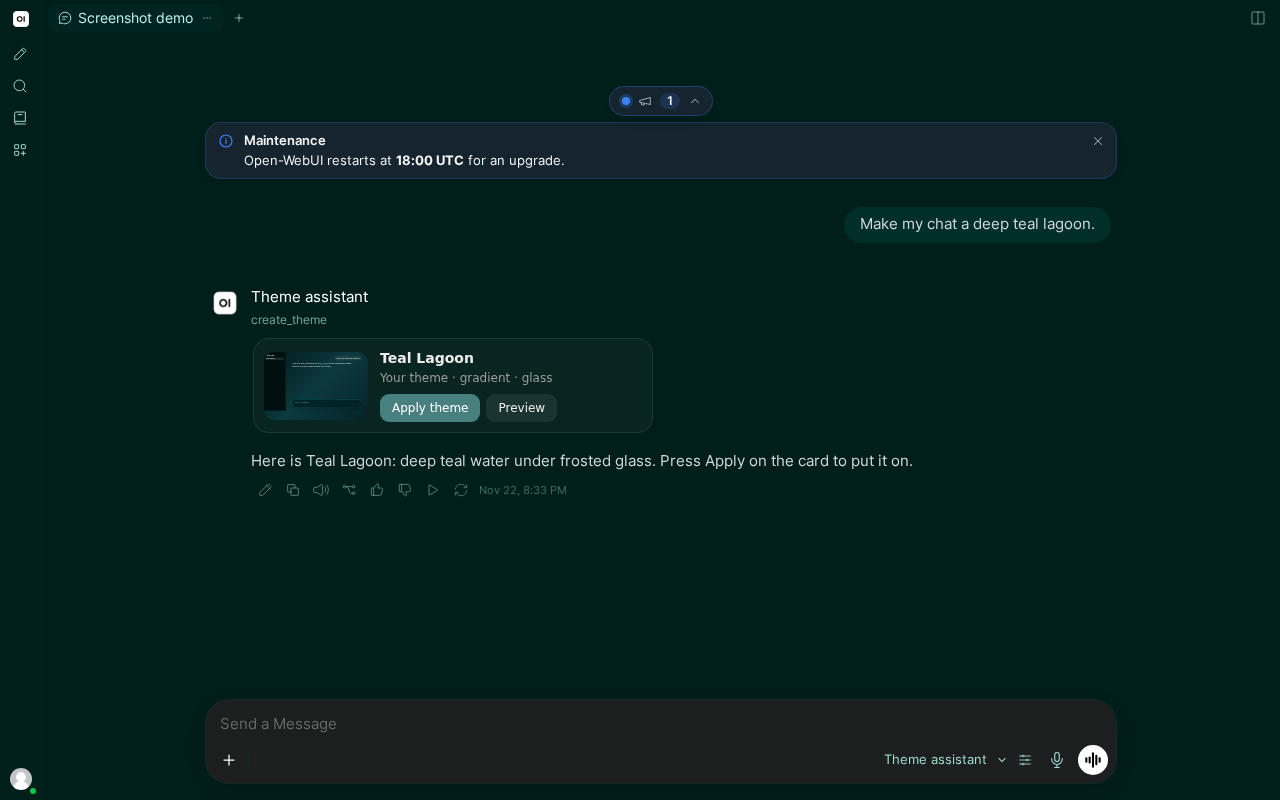
The model called the Launcher's create_theme; its card shows the theme with a live preview, and Apply signed for this user only.
test_tdp_launcher.py
The Theme Designer Pro Launcher, the tool the function installs: it opens the designer in a chat, and builds a theme someone describes as a card they can apply. Run with owpp test theme_designer_pro.
The launcher opens the designer in the chat
test_the_launcher_opens_the_designer_in_the_chat
Asked for the designer, the Launcher shows it in the chat: the instance theme for an admin (their own with my_theme), always their own for a user, with a Pop out link.
By hand
Ask "open theme designer" in a chat with the Launcher on: the designer opens under the reply.
The frame follows its height and scale valves
test_the_frame_follows_its_height_and_scale_valves
iframe_height sets the frame's height and iframe_scale shrinks the designer inside it to fit more.
By hand
Set the Launcher's Iframe Scale to 0.5 and open the designer in a chat: it shows at half size, filling the frame.
The launcher opens the designer where the function serves it
test_the_launcher_opens_the_designer_where_the_function_serves_it
The Launcher's designer_url must match the function's: it is where the frame points.
By hand
After changing the function's Designer Url, set the Launcher's to the same; the designer opens in chats again.
A described theme comes back as a card that applies it
test_a_described_theme_comes_back_as_a_card_that_applies_it
A theme someone describes comes back as a card with its preview and an Apply link signed for them alone: the designer applies it for that person, and nobody else.
By hand
As a user with Allow Personal Themes on, ask "make my chat a deep teal lagoon". A card shows the theme; Apply puts it on your theme only.
The model called the Launcher's create_theme; its card shows the theme with a live preview, and Apply signed for this user only.
Only an admin builds a theme for everyone
test_only_an_admin_builds_a_theme_for_everyone
everyone builds the instance theme, for an admin only; a user's is always their own.
By hand
As an admin, ask "a copper theme for everyone": the card says Instance theme.
Css the model wrote is checked first
test_css_the_model_wrote_is_checked_first
CSS the model writes may not load anything; with model_written_css off it may not write any.
By hand: not a live check
Not repeatable on purpose; the model reads the reason and calls again.
An animation the model wrote runs isolated and is checked first
test_an_animation_the_model_wrote_runs_isolated_and_is_checked_first
An animation the model writes may not reach the network or the page, and runs isolated; with model_written_animations off the model may not write one.
By hand
Ask "an animated background of drifting paper lanterns": the card's preview runs the new animation, marked (new).
A catalog animation is picked by the words asked for
test_a_catalog_animation_is_picked_by_the_words_asked_for
A background described in words is the closest animation of the catalog at canvas_catalog_url; with background_animations off the theme has none.
By hand
Ask "make my chat a koi pond": the card's preview shows the Koi Pond animation. Turn Background Animations off and ask again: a gradient instead.
The model is told every parameter
test_the_model_is_told_every_parameter
Each of the Launcher's parameters is described to the model, from its :param line.
By hand
Workspace > Tools > Theme Designer Pro Launcher: each method lists its parameters.
test_tdp_live.py
Theme Designer Pro's live updates (the stream every page keeps open) and its lifecycle: startup, valve changes, disabling, a new Designer Url, shutdown. Run with owpp test theme_designer_pro. The mock cannot hold an endless response open, so these tests open a page's stream the way the stream route registers it (td.stream()) and read what is sent to it.
A save reaches every open page
test_a_save_reaches_every_open_page
A save tells every open page, with the new theme's tags (a page that has them already skips the refetch) and the tab that saved (which does not reload itself).
By hand
Open a chat in a second browser, then save a theme in the designer: the chat changes without a reload.
A personal save reaches only its owners pages
test_a_personal_save_reaches_only_its_owners_pages
A personal save is told to its owner's pages only.
By hand
A user changes their theme in Settings > Themes; their other open tab follows, an admin's tab does not.
A page claims its stream to hear its own theme
test_a_page_claims_its_stream_to_hear_its_own_theme
The stream sends only cookies, which a signed-in page may lack; the page claims its stream by the id the stream announced, with its own token. A malformed id, or no session, is refused.
By hand: not a live check
Not repeatable by hand; with Allow Personal Themes on, a user's two tabs follow each other's saves even after a browser restart.
A worker past its stream limit tells pages to come back later
test_a_worker_past_its_stream_limit_tells_pages_to_come_back_later
Each worker holds at most sse_max_clients streams (config.yaml, 8192 by default, or TDP_SSE_MAX_CLIENTS); past it a page is told to retry in a minute.
By hand
Set TDP_SSE_MAX_CLIENTS=0 on the Open-WebUI container and restart it: a chat's /events request (DevTools > Network) answers "retry: 60000" and ends.
The limits default to the originals
test_the_limits_default_to_the_originals
Without the variables, config.yaml's limits are the original's: 8192 streams per worker, a keep-alive every 15 seconds, and 3 seconds between one user's AI Consultant requests.
By hand
owpp check theme_designer_pro lists the three variables with these defaults.
A valve that changes the look tells open pages
test_a_valve_that_changes_the_look_tells_open_pages
Saving the valves pushes the change to open pages when it changes how they look (Canvas FX, sidebar, overlays), and not otherwise.
By hand
With a chat open in another browser, set Sidebar Transparency to translucent: the chat's sidebar turns to glass without a reload.
Disabling strips the theme and enabling brings it back
test_disabling_strips_the_theme_and_enabling_brings_it_back
Disabling tells open pages to drop the theme, withdraws it from /static/custom.css, and leaves an inactive bootloader in /static/loader.js, which clears the theme a page kept; enabling tells open pages to fetch it again.
By hand
With a theme on, disable the function (Admin Panel > Functions): open chats go back to Open-WebUI's look. Enable it: they are themed again (within a minute, as the stream reconnects).
A new designer url moves the designer and keeps old pages themed
test_a_new_designer_url_moves_the_designer_and_keeps_old_pages_themed
Changing designer_url serves the designer there; the old URL keeps serving the theme to pages loaded before the change, until a restart.
By hand
Set Designer Url to /api/v1/my-themes: the designer opens there, and a chat that was already open stays themed.
A designer url outside the api is moved into it
test_a_designer_url_outside_the_api_is_moved_into_it
The single-page app answers every path outside /api, so a Designer Url there is served under /api/v1 instead; one ending in /me, which personal themes use, keeps the default.
By hand
Set Designer Url to /themes: the designer opens at /api/v1/themes.
A picture follows a new designer url
test_a_picture_follows_a_new_designer_url
Saved themes keep the address their pictures were uploaded at; after a Designer Url change they are served with the new one, which is the one that serves them.
By hand
Upload a page picture, then change Designer Url: the picture still shows.
A changed chat background tells its owners pages
test_a_changed_chat_background_tells_its_owners_pages
A user's Chat Background Image changing tells their pages, which fade it by its address.
By hand
With a theme that fades backgrounds, change Settings > Interface > Chat Background Image: the open chat shows the new one, faded.
A changed model image tells the pages
test_a_changed_model_image_tells_the_pages
A model's background image changing tells every page, naming the model when the instance theme fades it (its state names it publicly anyway), and only signed-in pages otherwise.
By hand
Edit a model's background in Workspace > Models: open chats with it update.
A shutdown ends the streams
test_a_shutdown_ends_the_streams
On shutdown every open stream is ended, so Open-WebUI stops at once instead of waiting for the container to be killed.
By hand
With a chat open, docker stop the Open-WebUI container: it stops in about a second, not ten.
A bootloader an old version wrote into index html is removed
test_a_bootloader_an_old_version_wrote_into_index_html_is_removed
Versions up to 1.6.2 wrote the bootloader into Open-WebUI's index.html; the first start removes it, and leaves the rest of the file alone.
By hand: not a live check
Not repeatable without one of those versions' index.html.
test_tdp_personal.py
Theme Designer Pro's personal themes (allow_personal_themes) and its pictures: the sign-in page's, the one behind pages without a chat, and a user's own. Run with owpp test theme_designer_pro.
A personal theme reaches only its owner
test_a_personal_theme_reaches_only_its_owner
A user's own theme is served to them alone; everyone else, signed in or not, keeps the instance theme.
By hand
With Allow Personal Themes on, a user picks a theme in Settings > Themes. Their chats show it; an admin's and another user's chats do not.
With Allow Personal Themes on, a user's own designer, starting from the instance theme: the instance-only controls are gone, and saves change only their theme.
With personal themes off the personal routes have nothing
test_with_personal_themes_off_the_personal_routes_have_nothing
With allow_personal_themes off a user saves no theme of their own, and the personal routes answer "nothing saved", so every page shows the instance theme.
By hand
Turn Allow Personal Themes off: users' Settings have no Themes tab, and their chats show the instance theme.
A user keeps their gallery when going back to the instance theme
test_a_user_keeps_their_gallery_when_going_back_to_the_instance_theme
Use instance theme drops a user's own theme and keeps their saved themes; Factory Reset in their designer drops both.
By hand
In Settings > Themes, press Use instance theme: the instance theme is back, and the gallery still has your themes. Factory Reset empties it too.
A personal theme stays within the admins limits
test_a_personal_theme_stays_within_the_admins_limits
The valves hold for personal themes too: with Enable Canvas FX off, a user's animation does not run either.
By hand
A user saves an animated personal theme; an admin turns Enable Canvas FX off: the user's chats show the theme without the animation.
A deleted accounts themes go with it
test_a_deleted_accounts_themes_go_with_it
Deleting an account deletes its personal theme and gallery.
By hand
Delete a user who had a personal theme (Admin Panel > Users): their folder under DATA_DIR/theme/users/ is gone.
The sign in picture is for everyone and changed by admins
test_the_sign_in_picture_is_for_everyone_and_changed_by_admins
The sign-in page's picture is read by anyone (nobody is signed in there) and uploaded or removed by an admin only.
By hand
In the designer's Backgrounds tab, upload a sign-in picture. A private window's sign-in page shows it.
A picture must be a picture of up to 5 mb
test_a_picture_must_be_a_picture_of_up_to_5_mb · 2 cases
A picture is a PNG, JPEG, GIF or WebP by its own bytes (never SVG, which can carry script), of up to 5 MB.
By hand
Upload an SVG in the Backgrounds tab: "Use a PNG, JPEG, GIF or WebP picture".
The page picture shows to anyone signed in
test_the_page_picture_shows_to_anyone_signed_in
The instance theme's picture behind pages without a chat shows to anyone signed in; only an admin changes it.
By hand
An admin uploads a page picture in the Backgrounds tab; a user's home page shows it.
A personal page picture is its owners
test_a_personal_page_picture_is_its_owners
A personal theme's picture is uploaded by, and shown to, its owner alone, and only while personal themes are on.
By hand
As a user, upload a page picture in your Settings > Themes; another user does not see it.
A change to a picture from another site is refused
test_a_change_to_a_picture_from_another_site_is_refused
Uploading or removing a picture is a change, refused from another site's page.
By hand: not a live check
Not repeatable without a second site.
test_tdp_shared.py
The code the function and the Launcher share (shared.py): the signed link a theme travels in, and filling a template's placeholders. Tested directly, with no Open-WebUI. Run with owpp test theme_designer_pro.
A placeholder is filled once
test_a_placeholder_is_filled_once
Each __NAME__ is filled in one pass: a value that holds a placeholder's text is left as it is, and a name with no value stays.
By hand: not a live check
Not repeatable by hand; the Launcher's frame shows a Designer Url as it was typed.
A link opens only as signed
test_a_link_opens_only_as_signed
A link opens with the key it was signed with and as it was signed: another key, a changed payload, another prefix, text that is not ASCII, or no key at all is no link.
By hand
Edit one character of a card's Apply link and open it: the designer opens without applying the theme.
The launcher and the function speak the same link
test_the_launcher_and_the_function_speak_the_same_link
The Launcher and the function take the format from the one shared.py, each in its own copy, so a link one signs is a link the other opens.
By hand
A card's Apply works (it opens the designer with the theme applied).
test_tdp_theme.py
Theme Designer Pro's instance theme: saving it, serving it to every page (and to the sign-in page), and the first-paint fragments of /static/custom.css and /static/loader.js. Run with owpp test theme_designer_pro.
Nothing saved yet is an empty theme
test_nothing_saved_yet_is_an_empty_theme
Before any save, the theme is empty, which the bootloader reads as "no theme": pages look like Open-WebUI's own.
By hand
On a fresh instance, enable the function and open a chat: nothing changes.
An admin saves the theme and every page gets it
test_an_admin_saves_the_theme_and_every_page_gets_it
A save by an admin is served to every page, signed in or not (the sign-in page is themed too): its CSS, and its state with the CSS sections the sign-in page assembles.
By hand
As an admin, pick a theme in the designer (in Live mode). Open a chat in another browser, and the sign-in page in a private window: both show it.
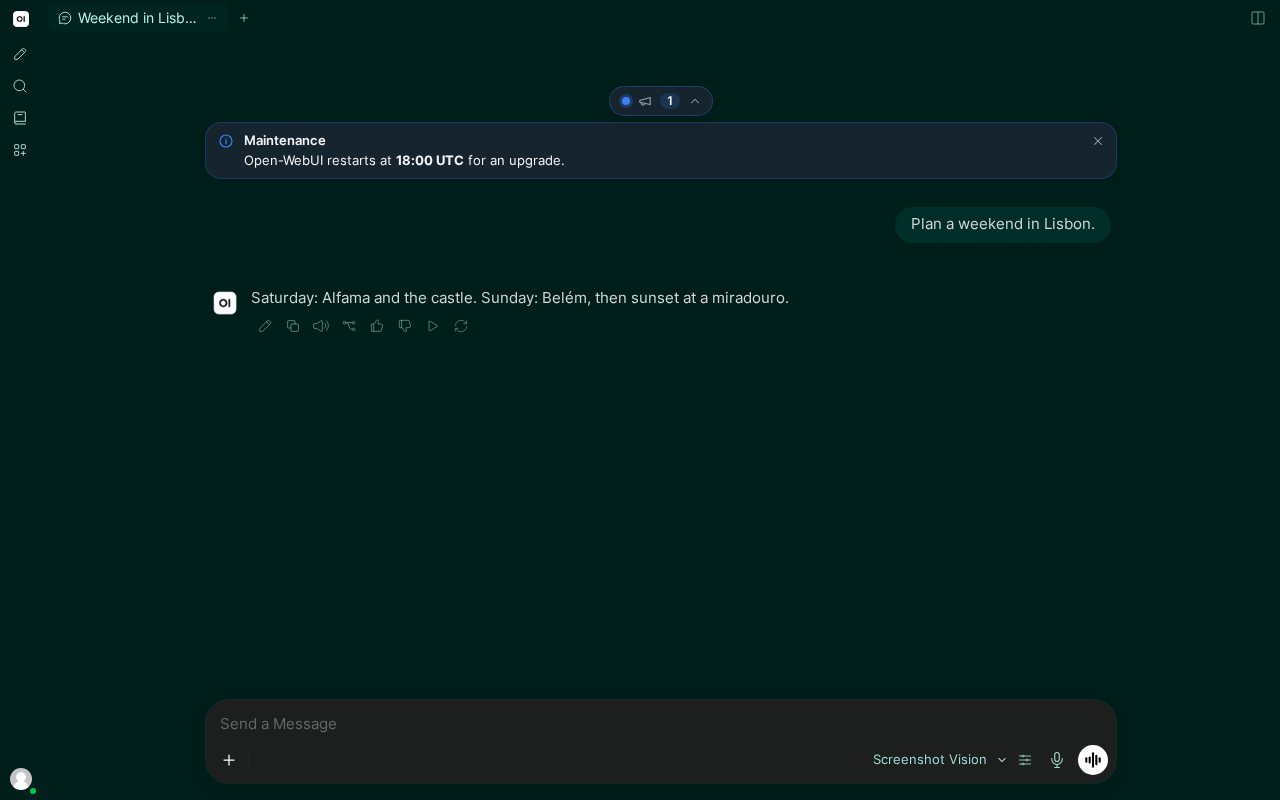
After: the function on and that palette saved; every page, this chat included, wears it from its first paint.
An unchanged theme is not sent again
test_an_unchanged_theme_is_not_sent_again
A page that already has the theme gets a 304 for it, a gzipping proxy's weakened tag included.
By hand
Reload a chat with DevTools > Network open: theme.css and state.json answer 304.
Saving the same theme again writes nothing
test_saving_the_same_theme_again_writes_nothing
The same theme again (a designer sends it as it opens) is not written, and tells no open page to reload.
By hand
Open the designer in two tabs and reload one: the other does not reload.
A user cannot save the instance theme
test_a_user_cannot_save_the_instance_theme
Only an admin changes what everyone sees.
By hand
As a user, POST to /api/v1/theme-designer (from DevTools): 403.
A change sent from another site is refused
test_a_change_sent_from_another_site_is_refused · 4 cases
A page on another site can send the session cookie along; a change it sends is refused, told by the browser's Sec-Fetch-Site, or the Origin where there is none.
By hand: not a live check
Not repeatable without a second site; from another origin's DevTools, a fetch with credentials to /api/v1/theme-designer answers 403.
A change from open webuis own pages goes through
test_a_change_from_open_webuis_own_pages_goes_through
The same page's Sec-Fetch-Site, or an Origin with this site's host or WEBUI_URL's, is Open-WebUI's own page.
By hand
Save in the designer: it saves.
A save must be json
A save is JSON: anything else would be a form another site can send without asking.
By hand: not a live check
Not repeatable from the designer, which always sends JSON.
An oversized theme is refused
test_an_oversized_theme_is_refused · 3 cases
A theme over its limits (5 MB of CSS, of state or of sections; 20 MB of gallery; 64 MB in all) is refused before it is written.
By hand: not a live check
Not repeatable from the designer, which keeps themes far smaller.
A body bigger than the whole limit is refused unread
test_a_body_bigger_than_the_whole_limit_is_refused_unread
A body that says it is over 64 MB is refused before it is read.
By hand: not a live check
Not repeatable from the designer.
A save that is not a theme is refused
test_a_save_that_is_not_a_theme_is_refused · 4 cases
What would load as an empty designer or an empty gallery is refused, so its next save cannot write that over the theme.
By hand: not a live check
Not repeatable from the designer.
A gallery alone is saved and tells open designers
test_a_gallery_alone_is_saved_and_tells_open_designers
Saving only the gallery (themes and presets, as Draft mode does) keeps the theme, and open designers hear of it; the same gallery again is not written.
By hand
In Draft mode, save a preset; another open designer shows it after it reloads.
The gallery is for admins
test_the_gallery_is_for_admins
The instance gallery is the admins'.
By hand
As a user, open /api/v1/theme-designer/library.json: 403.
A global reset removes the instance theme from every page
test_a_global_reset_removes_the_instance_theme_from_every_page
Global Reset deletes the theme, its sections and its gallery; open pages drop it, and /static/custom.css no longer carries it.
By hand
In the designer, Docs > Danger Zone > Global Reset. Open chats go back to Open-WebUI's own look without a reload.
Canvas fx off takes the scripts out of what is served
test_canvas_fx_off_takes_the_scripts_out_of_what_is_served
With enable_canvas_fx off no page runs an animation: the served state has none, and the saved theme keeps it for when it is turned back on.
By hand
With an animated theme saved, turn Enable Canvas FX off. Chats show the theme without its animation; turn it back on and the animation is back.
Sign in page theming off keeps the sign in page plain
test_sign_in_page_theming_off_keeps_the_sign_in_page_plain
With enable_auth_page_theming off, every Show on Auth Pages flag is served off.
By hand
With a theme shown on the sign-in page, turn Enable Auth Page Theming off. The sign-in page (private window) is plain again.
Sidebar transparency lets the background through the sidebar
test_sidebar_transparency_lets_the_background_through_the_sidebar · 2 cases
sidebar_transparency rewrites the theme's sidebar rules as it is served: frosted for translucent, see-through for transparent (translucent on phones), and hides Open-WebUI's fades at the sidebar's ends.
By hand
With an animated theme, set Sidebar Transparency to translucent: the animation shows through a frosted sidebar. Set it to transparent: it shows through clearly.
Translucent overlays are frosted from the first paint
test_translucent_overlays_are_frosted_from_the_first_paint
overlay_transparency translucent frosts the settings dialog and the menus, in the served theme and in /static/custom.css, so they never flash opaque first.
By hand
Set Overlay Transparency to translucent and open Settings: the dialog is frosted glass.
The first paint stylesheet carries the theme colours
test_the_first_paint_stylesheet_carries_the_theme_colours
/static/custom.css, which blocks the first paint, carries the theme's colours and custom CSS inside a switch the bootloader turns off where the theme does not belong, and leaves the transparency rules to the bootloader.
By hand
Reload a themed chat: it paints in the theme's colours with no flash of Open-WebUI's own.
After: the function on and that palette saved; every page, this chat included, wears it from its first paint.
Custom css with unbalanced braces waits for the bootloader
test_custom_css_with_unbalanced_braces_waits_for_the_bootloader
Custom CSS whose braces don't balance would break out of its switch in a stylesheet shared with other plugins, so it is left to the bootloader.
By hand: not a live check
Not repeatable from the designer, which balances what it writes.
The bootloader is on every page
test_the_bootloader_is_on_every_page
/static/loader.js carries the bootloader, set to this designer URL, with the theme's state inlined for the first paint, minus the animations' code.
By hand
Open a chat and DevTools > Sources > /static/loader.js: it holds the "owui-theme-designer-pro" block.
After: the function on and that palette saved; every page, this chat included, wears it from its first paint.
A saved theme holding placeholder text is served as it is
test_a_saved_theme_holding_placeholder_text_is_served_as_it_is
The theme is inlined after every placeholder is filled in, so a theme that happens to hold one's text (say, in an animation's comment) is served as written.
By hand: not a live check
Not repeatable by hand.
The themes tab and page follow their valves
test_the_themes_tab_and_page_follow_their_valves · 4 cases
show_in_admin_settings (on by default) adds a Themes tab to the Admin part of Settings, allow_personal_themes one to every user's Settings, and show_in_admin_panel a Themes page to the Admin Panel's top bar.
By hand
Open Settings: an admin sees Admin > Themes. Turn Show In Admin Panel on: the Admin Panel has a Themes page between Functions and Settings.
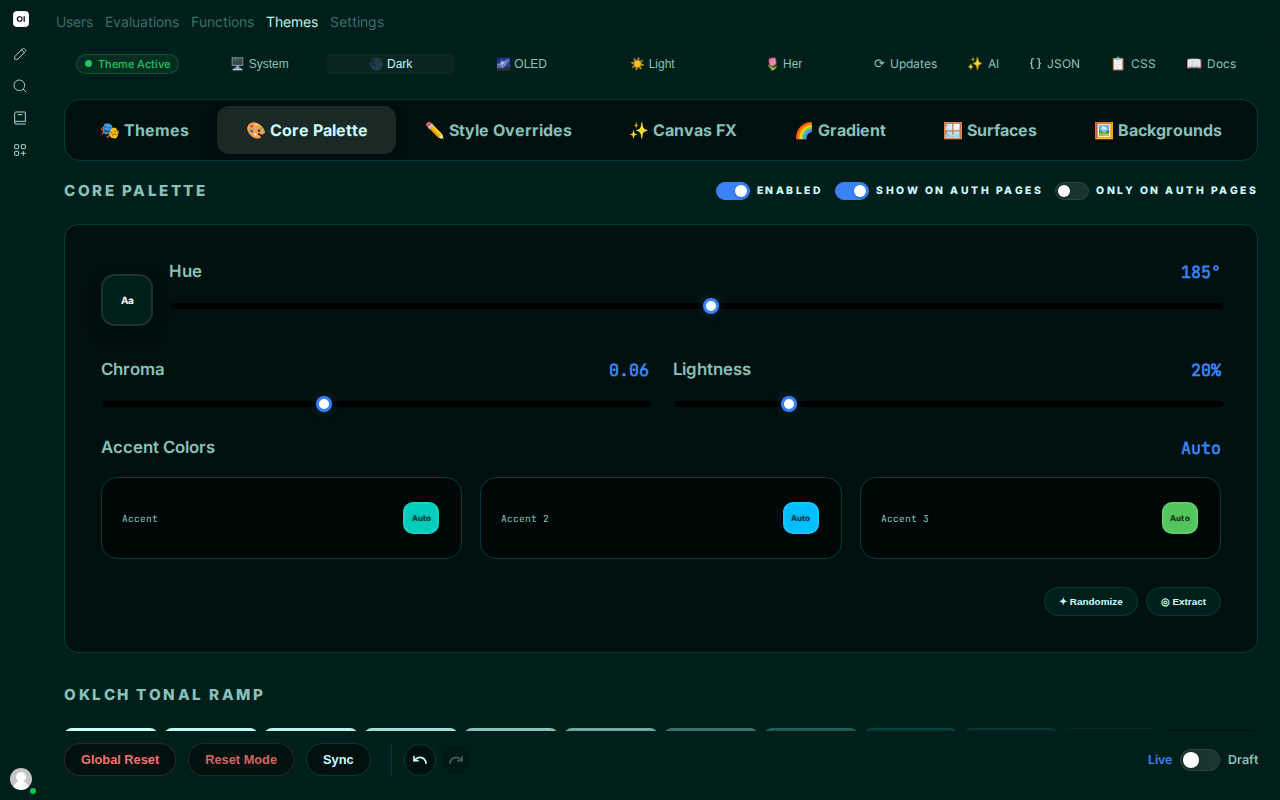
Show In Admin Panel on: a Themes page in the Admin Panel's top bar, with the designer in it.
The bootloader follows its valves
test_the_bootloader_follows_its_valves · 4 cases
The bootloader on every page follows calm_chat_column (animations fade behind the chat), enable_canvas_api_access (animations get the viewer's token: leave it off), enable_canvas_fx and allow_personal_themes.
By hand
Turn Calm Chat Column on and reload a chat with an animated theme: the animation fades behind the messages.
vision_router
test_vision_router.py
Dynamic Vision Router against a mock Open-WebUI: a message with an image is sent to the model in the vision_model_id valve. Run with owpp test vision_router.
A message with an image goes to the vision model
test_a_message_with_an_image_goes_to_the_vision_model
With vision_model_id set, a user's message with an image is sent to that model instead.
By hand
Set vision_model_id to a model that can see images, and choose another model in a chat as a user who is not an admin. Send a picture: the reply comes from the vision model.
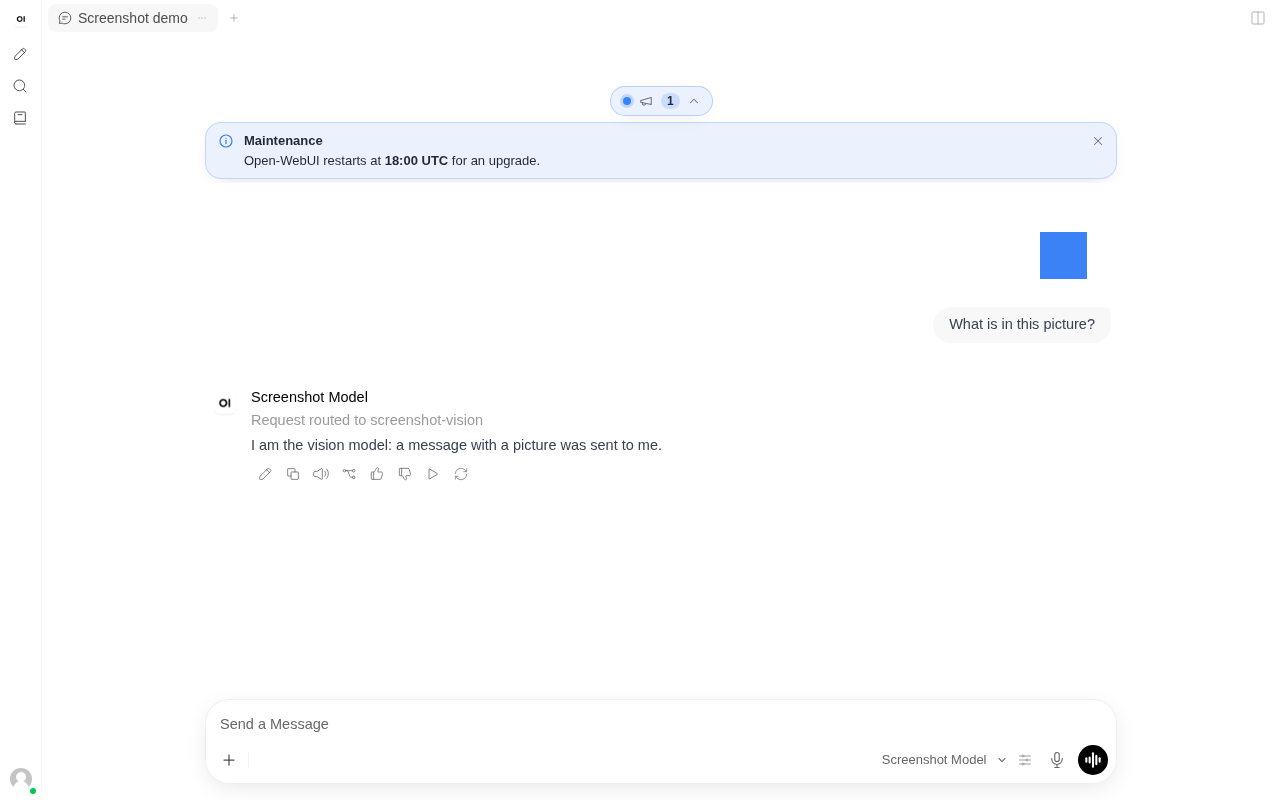
A picture sent to the screenshot model: the filter sent it to the vision model instead, and the status line says so.
Images attached the older way count too
test_images_attached_the_older_way_count_too
An images list on the message counts as well as an image_url part.
By hand: not a live check
Not repeatable on Open-WebUI 0.13, which sends images as image_url parts.
A message without an image stays with its model
test_a_message_without_an_image_stays_with_its_model
Text alone is not rerouted.
By hand
In the same chat, send text only. The chosen model answers.
Without a vision model nothing is rerouted
test_without_a_vision_model_nothing_is_rerouted
vision_model_id is empty by default, and then nothing changes.
By hand
Clear vision_model_id and send a picture. The chosen model answers.
Admins are left alone unless it is turned on for them
test_admins_are_left_alone_unless_it_is_turned_on_for_them
By default only users who are not admins are rerouted; enabled_for_admins turns it on for admins, and enabled_for_users off for everyone else.
By hand
Send a picture as an admin. The chosen model answers. Turn enabled_for_admins on and send it again: the vision model answers.
Some models are never rerouted
test_some_models_are_never_rerouted
Models in skip_reroute_models, and the vision model itself, keep their messages.
By hand
Add the chosen model to skip_reroute_models and send a picture. It answers.
It can say where the message went
test_it_can_say_where_the_message_went
With status on, the chat shows a status line naming the vision model.
By hand
Turn status on and send a picture. "Request routed to <model>" shows above the reply.
A picture sent to the screenshot model: the filter sent it to the vision model instead, and the status line says so.
The library's own tests
The tests in tests/ cover owpp itself (the bundler, runtime, libraries, deploy and CLI) against stubbed Open-WebUI modules, so they have no live equivalent step by step. Run them with uv run pytest.
| File | What it covers | Tests | With a docstring |
|---|---|---|---|
plugin_libs_test.py |
Tests for the built-in libraries in src/owpp/runtime/lib/ (routes, jobs) with Open-WebUI stubbed out. Run by pytest. | 31 | 0 |
plugin_runtime_test.py |
Tests for src/owpp/runtime/plugin_runtime.py with Open-WebUI stubbed out. Run by pytest. | 14 | 0 |
test_access.py |
Who may reach a plugin's routes: declared in plugin.yaml, enforced by the routes library. Real FastAPI does the dependency resolution; only Open-WebUI's session check and its function table are stubbed. Every route needs a signed-in user unless a mount says public in so many words. |
80 | 1 |
test_assets.py |
The Shared Assets Protocol end to end: bundled plugins publish their assets/ files and the real shared route (the vendored block) serves them, through Starlette. | 19 | 1 |
test_build.py |
owpp build and owpp deploy --from: bundle in one place, deploy that build in another. |
15 | 0 |
test_bundle.py |
The bundler: headers, function folders, tool and skills, built-in libraries, function types. | 103 | 12 |
test_cli.py |
The CLI: check, init, and the commands end to end. | 25 | 2 |
test_command_docs.py |
Every owpp command has a page in docs/commands/, and the page documents each of its flags. | 3 | 2 |
test_create.py |
owpp create: the plugin it writes (owpp.create) and the wizard that asks for it (owpp.wizard). |
36 | 3 |
test_deploy.py |
Deploying against a stand-in Open-WebUI: create, update, global, prune, valves, --only. | 57 | 0 |
test_env.py |
${NAME:-default} templates: resolved from the container's environment when the plugin loads, never when it is bundled. | 21 | 0 |
test_env_docs.py |
Every environment variable owpp reads has an entry on docs/environment-variables.md, and every entry there is one owpp reads. | 3 | 2 |
test_events.py |
@on(...) event handlers: how they dispatch at runtime, and what owpp check refuses. |
34 | 0 |
test_jobs.py |
The sync mixin supplies its own valves, and the default interval is declared in plugin.yaml. | 19 | 0 |
test_libraries.py |
The library catalogue: what each built-in library pulls in, what turns it on, what it carries. | 13 | 4 |
test_lint.py |
The warnings owpp check gives about valves and tools. | 35 | 6 |
test_live_stack.py |
The Docker stack the screenshots and the live suite run (tools/screenshots/compose.yaml). | 4 | 4 |
test_migrate.py |
owpp migrate: bringing a plugin.yaml written for an older protocol up to the current one. |
21 | 3 |
test_mock.py |
The mock Open-WebUI itself (owpp.testing): the parts plugins written elsewhere rely on, beyond what the example plugins' own tests already exercise. | 9 | 8 |
test_plugin_source.py |
owpp.testing.plugin_source: a plugin's files imported as modules, each plugin with its own shared.py and libraries. | 5 | 3 |
test_pull.py |
owpp pull: moving a plugin's pinned commit to the latest one of the branch it follows. |
15 | 0 |
test_release.py |
tools/release.py, which the release workflow runs to prepare a release or hotfix branch. | 6 | 0 |
test_release_notes.py |
The GitHub release notes the publish workflow writes from CHANGELOG.md for a version tag. | 3 | 1 |
test_set_key.py |
Changing one value in plugin.yaml text: comments, layout, quoting and line endings kept. | 2 | 0 |
test_skill.py |
The owpp agent skill (skills/owpp): well formed, and its spec examples still work. | 3 | 2 |
test_sources.py |
Plugin files taken from a git repo, pinned to a commit, read through Sources. | 18 | 0 |
test_stubs.py |
The open_webui type stubs: written from the mock, and the mock has what the plugins import. | 2 | 2 |
test_test_docs.py |
Every example plugin's test says what it checks and how to repeat it by hand, as docs/testing/writing.md asks ("Describe every test"). The test catalogue on the docs site is built from these docstrings. | 2 | 0 |
test_upstream.py |
A whole plugin folder taken from git (source: {plugin: true}), built by the owpp reading it. |
19 | 0 |
test_versioning.py |
Versions: owpp version, owpp check --since, CHANGELOG.md, and deploy's downgrade guard. |
24 | 1 |